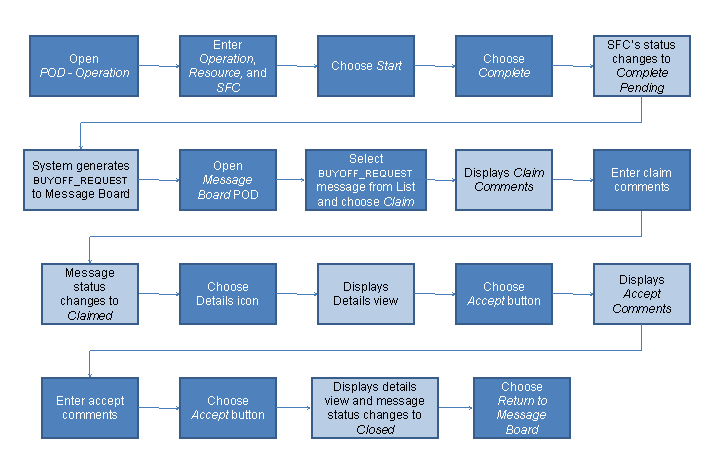
Example: Processing Buyoff Request Message
The following procedure includes steps that the operator might perform when processing a buyoff request message on the Message Board.
Prerequisites
You have created inspection buyoffs and attached to the
ASSEMBLY
operation (see Buyoff Maintenance).You have created SFC numbers for the
MANMAT1
material. These SFC numbers are to be processed in theOperation
POD at theASSEMBLY
operation.The user belongs to a user group that can accept buyoffs.
Procedure
Open the default operation POD (
POD – Operation
).Enter the following data:
Field
Value
Operation
ASSEMBLY
Resource
DEFAULT
SFC
MANMAT1-0001
Choose
Start
to process the SFC numberMANMAT1-0001
.The status of the SFC number changes to
Active
.Choose
Complete
.The status of the SFC number changes to
Complete Pending
because there is an open buyoff at this operation.At the same time the system generates the buyoff request message to the Message Board.
Open the Message Board.
Find the message of the
BUYOFF_REQUEST
type and select it in the list.Choose
Claim
on the bottom of the Message Board.The
Claim Comments
screen appears.Enter a comment and choose
Claim
.The status of the message changes to
Claimed
.Choose the
Details
icon to view message details.The
View Message
screen with theAccept
andReject
buttons appears.Do one of the following:
Choose
Accept
to accept the buyoff.The system displays the
Accept Comments
screen.When you enter a comment and choose
Accept
, the comment is logged against the message, the status of the message changes toClosed
. At the same time the system sends the accept request back to the operation and completes the SFC number at the operation. The status of the SFC number changes fromComplete Pending
toComplete
.Choose
Reject
to reject the buyoff.The system displays a simplified
Log NC Reject
screen with the default NC code ofCOMMENT
.When you enter a comment and choose
Reject
, the comment is logged against the message, the status of the message changes toClosed
. At the same time the system sends the accept request back to the operation and reopens the buyoffs for the SFC number at the operation. The status of the SFC number changes fromComplete Pending
toIn Queue (R)
. All the completed buyoffs are reopened.
Process Flow
The following figure provides a high-level flow of this example: