 Generate RIB Rules (Mass Procedure)
Use
You can automatically generate a new RIB rule based on an RIB object or revenue cover group using transaction FMRBGENMD.
RIB objects:
You define a RIB rule by specifying the revenue and expenditure FM account assignments to be used in the RIB process. Each RIB rule is assigned to a RIB object, which aggregates revenues from revenue posting addresses. The system applies a two-step procedure for assigning a RIB object to its contributing posting addresses, as shown below:
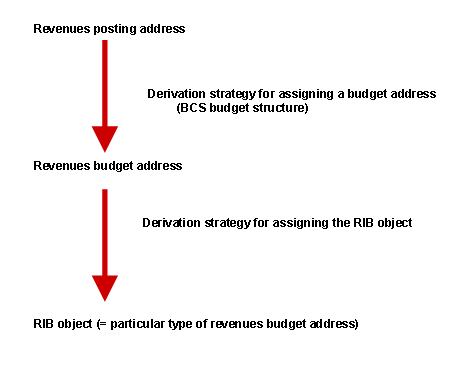
To generate new RIB rules, you must specify the set of addresses on which the generation is based. You can choose between posting or budget addresses, from which new RIB objects will be derived, and you can also decide to select addresses from application data ( revenue documents or budget documents ) or from the budget structure.
Revenue cover groups:
Revenue cover groups offer an alternative to RIB objects for defining contributors to RIB rules. A revenue cover group consists of revenue budget addresses, and bundles revenue and revenue budget data. A single member of each revenue cover group must have been assigned the role of ‘RIB source address’ before it can contribute to the creation of RIB rules. This address functions in a similar way to a RIB object in budget documents.
For more information on generating revenue cover groups for use with RIB rules, see Creating Cover Groups .
 Note
Note
Please note that for each generated RIB rule, only a single receiving budget address can be assigned. This is the budget address which will receive the full RIB amount calculated according to the new RIB rule. If you need to distribute this amount to several budget addresses, you must specify them, together with the desired percentages, in the Process Single RIB Rule transaction FMBRBRULE.
Prerequisites
To have RIB rules generated automatically, you must have set up a derivation strategy for the generation of RIB rules in Customizing activity Maintain Derivation Strategy for Rule Generation in Customizing for Public Sector Management under Funds Management -> Budget Control System (BCS) -> Budgeting -> Control Budgeting Flow -> Revenues Increasing the Budget .
 ( )
( )
The specification of a procedure (distribution procedure or call procedure) is also possible in the same Customizing activity.
Where call procedure is chosen, you can assign one, and only one, automatic cover group to the new RIB rule with call procedure. If you prefer, however, you can manually assign an automatic cover group later in single maintenance of the RIB rule (transaction FMRBRULE) or single maintenance of the automatic cover group (transaction FMCERULE).
Activities
Enter the FM area, the fiscal year, and the budget category to be used for RIB.
Specify whether you want to base the generation on budget addresses or on posting addresses.
If you want to do a test run, checkmark the corresponding box. If you only want to update the index, that is, only add new contributing revenue budget addresses to already existing RIB rules,checkmark the corresponding box.
After all entries are made, click on the Execute icon. In the subsequent output list, you will see the list of new RIB rules generated.