 Defining Non-Eligible Budget/Releases for Automatic CE Rules
Use
You can specify whether budget values are defined as eligible or non-eligible for cover in the Customizing for the BCS budget type .
There are the following options for customizing the budget types for cover eligibility:
A budget type can be non-consumable (that is, this budget cannot be used to cover budget consumption in availability control)
A budget type can be consumable and non-eligible for cover or
A budget type can be consumable and eligible for cover
If you work with budget releases in your organization, in Customizing you can create up to two budget types for releases:
One budget type for releases can be non-eligible for cover
One budget type for releases can be eligible for cover.
By defining whether your budget types are consumable and eligible/non-eligible for cover or by defining releases as eligible/non-eligible for cover, you can more closely control how cover eligibility influences budget execution processes in your organization.
 Caution
The distinction between budget values (or releases) that are eligible or non-eligible for cover is only relevant for availability control with automatic cover groups. The following graphic explains the logic applied for availability control:
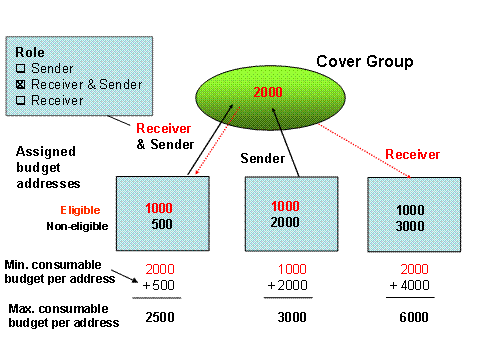
For budget addresses with the roles Sender or Receiver & Sender , only the eligible budget values (or releases) contribute to the total shared budget of the automatic cover group. However, for budget addresses with the role Receiver , this distinction has no effect: these budget addresses never share their budget with the automatic cover group, since their entire budget is implicitly non-eligible .
The use of non-eligible budget (or releases) enables you to define budget values that can be only consumed by postings to the specific budget address to which they belong. In this way, you can define a minimum consumable budget amount per budget address, which cannot be consumed by any other member of the automatic cover group.
Prerequisites
See Cover Eligibility for the prerequisites on maintaining cover groups. Furthermore, you must have maintained budget types for BCS .
Activities
Access the IMG Public Sector menu in
 Funds Management Government
 Budget Control System (BCS)
BCS Budgeting
Definition of Budget Data
Budget Types
Define Budget Types.
Budget Control System (BCS)
BCS Budgeting
Definition of Budget Data
Budget Types
Define Budget Types. 
In the corresponding column, specify whether a budget type is to be eligible for cover or not.
If you work with releases, go to the IMG Public Sector menu in
Funds Management Government
Budget Control System (BCS)
BCS Budgeting
Definition of Budget Data
Budget ReleasesàDefine Budget Types for Release.
Here you can create two budget types for releases, and specify one of them as non-eligible for cover by marking the checkbox of the corresponding column. The second budget type for release must be eligible for cover .
Save your entries.