 Reducing Earmarked Funds
Earmarked funds can be reduced by purchasing documents, financial accounting documents or manually.
The graphic represents the options you have for reducing the earmarked funds by Materials Management and Financial Accounting commitments documents and actual documents.
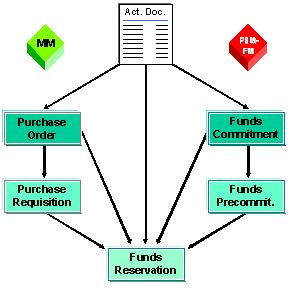
Purchasing documents can only reduce funds reservations.
Purchase requisition
Purchase order
Financial Accounting documents (expenditure) or documents of the MM invoice verification can either reduce the funds commitment or the funds reservation.
Vendor invoice
Down payment request
Down payment
With the Business Add-In Define Document Type for Reduction by Other Documents (FMFR_ALLOW_DOCCATS), you can define which document types can be reduced and that funds precommitments can be reduced.
For more information, see the implementation guide of Funds Manageme nt Government in the IMG activity BAdI: Define Document Types for Reduction by Other Documents.
Financial Accounting documents (revenues) can reduce forecast of revenues
Customer posting
Vendor credit memo
Down payment request
Down payment
Manual reduction
You can manually reduce funds reservations, funds precommitments and funds commitments. When manually reducing earmarked funds it is possible to reference a Financial Accounting, a Materials Management or Controlling document. For example, you can ensure that there is a correct earmarked funds reduction if during the posting of another document in another component, the including of an earmarked funds was forgotten.
Totals reconciliation earmarked funds (RFFMRC20)
Each reduction in stored in a development record. These development records are then summarized in totals records to optimize performance. You can display the development records using the function Display Consumption History .
You can reconstruct the totals records if necessary using the report Totals Reconciliation Earmarked Funds (RFFMR20) to correct the records that are different to the totals records.