Remainder Cleanup: Integration of Accounting
To integrate fiscal and business accounting, you have to partly assign G/L accounts differently to those which apply to all request types, to the FM account assignments that you post in the flat remainder cleanup .
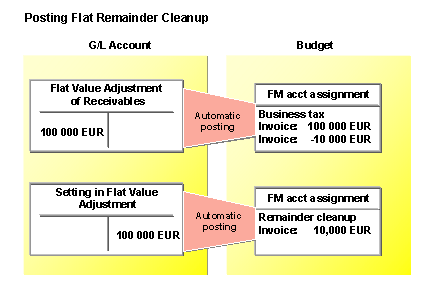
Below is an example introduced in section Flat Remainder Cleanup . For integrating fiscal and business accounting, the G/L account “Flat valuation adjustment of receivables” must be assigned to a different FM account assignment, for the request type Flat remainder cleanup . The assignment is then as follows:
FM Account Assignment |
G/L Account |
The Assignment Applies to |
|---|---|---|
Business tax |
Sales revenues |
All request types |
Flat valuation adjustment of receivables |
Request type: Flat remainder cleanup |
|
Remainder cleanup |
Setting in flat valuation adjustment |
All request types |
In order to represent the remainder cleanup in the Financial accounting component correctly, you must post a flat remainder cleanup (sender FM account assignment “Business tax”, receiver FM account assignment “Remainder cleanup”). Because special G/L accounts were defined for the request type flat remainder cleanup (see table: Assigning FM account assignment to G/L account), the program posts the following accounts: