 Multi-Year Budget Execution: Closing Operations
Use
In contrast to a budget managed by fiscal year, for the multi-year budget you do not need to carryforward budget values (commitment budget) such as commitment/actual postings with the fiscal year change.
Closing operations similar to those required for the fiscal year change are only necessary for multi-year budget execution if you close an old budget and want to carry over the existing budget and/or commitment values to the following budget. You can use the following transfer posting programs for this.
The following graphic illustrates the closing operations for budgets. Budget and commitment postings of the old budget can be carried over to the new budget using an account assignment derivation.
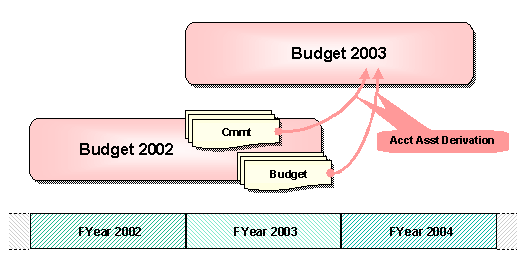
Graphic: Transfer posting of budget and commitment between budgets
Prerequisites
The reassignment programs use the assignment rules defined in a derivation strategy between the account assignments of the old and new budget.
For more information, see Derivation Strategy for Reassignment .
Features
Transfer Postings of Budget Values
In the Budget Control System, the program Transfer Budget Data (RFFMMP_TRANSFER) supports the posting of residual budget. You can configure the selection of FM account assignments in such a way that the residual budget of a fund (old budget) is carried over to a different fund (new budget).
The BCS Key Figures are evaluated for the program run in order to determine the respective residual budget of the fund. SAP delivers the following key figures for multi-year budget execution:
BY_RESIDUAL (all residual budget)
BY_RESIDU_CONS (consumable Budget)
BY_RESIDU_RCONS(residual budget not defined as consumable budget)
You can also execute the program run with customer-specific key figures and define the selection of residual budget to be posted yourself. For information on defining BCS key figures, see the Customizing of Funds Management, under
 Budget Control System
  BCS Budgeting ControlBudgeting Flow Define Key Figures.
Posting Commitment Values
You can use program Transfer Open Commitment to post commitment values. Customer-specific requirements can be implemented using the Business Add-In (BAdI) Control Reassignment .
Annual-Based Evaluation of Residual Budget
If fiscal year-based reporting is also relevant for your organization, you must carry over the residual budget defined for evaluation purposes to the following year with the fiscal year change. For more information on this, see Multi-Year Budget Execution: Reporting .
Activities
You execute the program Transfer Budget Data in the menu of Funds Management, under
Budgeting Budget Control System (BCS) Tools Entry Documents Transfer Between Budget Types
.
You execute the program Transfer Commitment in the menu of Funds Management, under
Additional Functions Closing Operations Commitments/Actuals
Reassign Open Commitment
.
If you want to supplement the program with a customer-specific enhancement, implement the BAdI in the Customizing of Funds Management, under
Closing Operations Commitment Closing Operations Business Add-Ins Control Reassignments.
For more information, see the relevant IMG or program documentation.