
 Creating Persistent Entities

Use
You use this procedure to create new Java persistent entities or to create persistent entities from existing classes.
Prerequisites
You have created:
● An EJB 3.0 Project
More information:
 Creating EJB 3.0
Projects
Creating EJB 3.0
Projects
● A connection to your database and you are connected to your database
More information: Creating Database Connections
Procedure
Creating New Persistent Entities
...
1. Choose File → New → Other from the main menu.
2. Choose Java Persistence → Entity from the New dialog.
3. Enter a name for the package or browse to a package in the Package field.
4. Enter a name for your entity in the Name field.
5. Choose Finish. The entity appears in the ejbModule project folder.
Creating Persistent Entities From Existing Classes
...
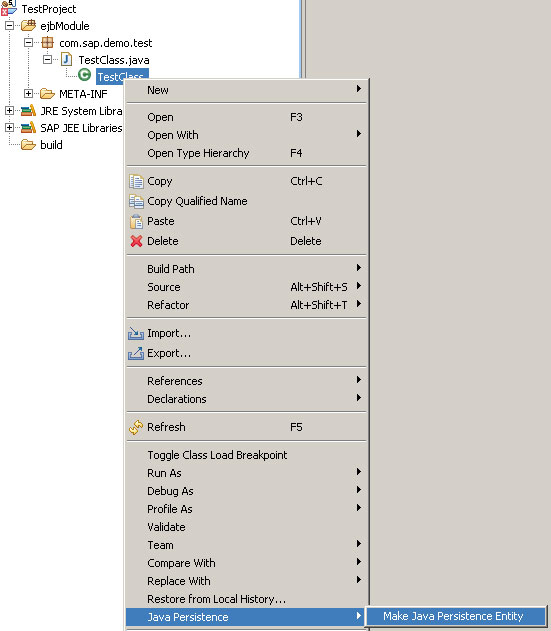
1. Select the file of the class in the Project Explorer, for example TestClass.java.
2. Expand the node.
3. Select the class and choose Java Persistence → Make Java Persistence Entity from the context menu.
Adding Fields to Entities
...
1. Select the entity in the Package Explorer.
2. Choose Open from the context menu.
3. Add the fields for the entity to the source code of the class.

@Entity
public classEmployee {
@Id
private Long id;
private String firstNname;
private String lastName;
private String address;
}
4. Choose Save.