 Scope for Hierarchy-Specific Changes
You can determine the extent to which users can make parallel changes to a hierarchy that belongs to a particular hierarchy type. A change to a hierarchy can comprise adding a node, moving a node, removing a node, changing the attributes of a node, or creating a hierarchy. After a change to a hierarchy is saved to a change request, changes to interlocked nodes must be saved to the same change request. The system determines which nodes are interlocked by referring to the Interlocking
setting in Customizing for the relevant hierarchy type.
Hierarchy nodes that represent business objects are technically distinct from the business objects themselves. Interlocking affects the parallel processing of hierarchy nodes only.
The Interlocking Setting
You can define the scope of interlocking in Customizing for Master Data Governance
under 
Process Modeling

Hierarchies
Define Scope for Changes

The Interlocking
setting applies to a Hierarchy Type
and specifies which nodes besides the node being changed are interlocked while a hierarchy-specific change is in process. The setting is described in the table below:
| Interlocked Nodes |
|---|---|
| Nodes assigned to the parent node of the node being changed. |
| Interlocking propagates upwards and downwards from the parent node of the node being changed:
|
When applying the Interlocking
setting, be aware of the following:
Choosing the scope for hierarchy-specific changes involves striking a balance between centralized control and process efficiency.
The Interlocking setting also defines the locking of nodes to avoid competing changes by multiple users who work on the hierarchy at the same time.
Prerequisites
To minimize business disruption, we recommend that you define the scope for changes to a hierarchy type when you define the hierarchy type within a data model. You can only change the scope for changes to a hierarchy type when no pending change requests exist for any hierarchy of this type. If you must change the scope after you have defined the hierarchy type and you must then transport your changes, ensure that no pending changes exist for the affected hierarchies in the target system.
Example
The hierarchy called Global consists of continents, countries, cities, and teams. A change request to add Rome as a child node to Italy as the parent node is pending. No other hierarchy-relevant change requests are pending. If you want to change nodes that are specified as Interlocked
in the figures and descriptions below, you must use the pending change request that assigns Rome to Italy. For changes to other nodes, you can use separate change requests.
Interlocking – Loose
The figure below shows how the Interlocking
setting of Loose
affects a hierarchy in the scenario where Rome is added to Italy.

Interlocking – Loose
Loose interlocking affects all nodes that are assigned to the parent node of the node being changed. The node being changed is Rome and its parent node is Italy. Only the direct child nodes of Italy - Rome and Milan - are interlocked with the pending change request.
Interlocking – Strict
The figure below shows how the Interlocking
setting of Strict
affects a hierarchy in the scenario where Rome is assigned to Italy in a pending change request.
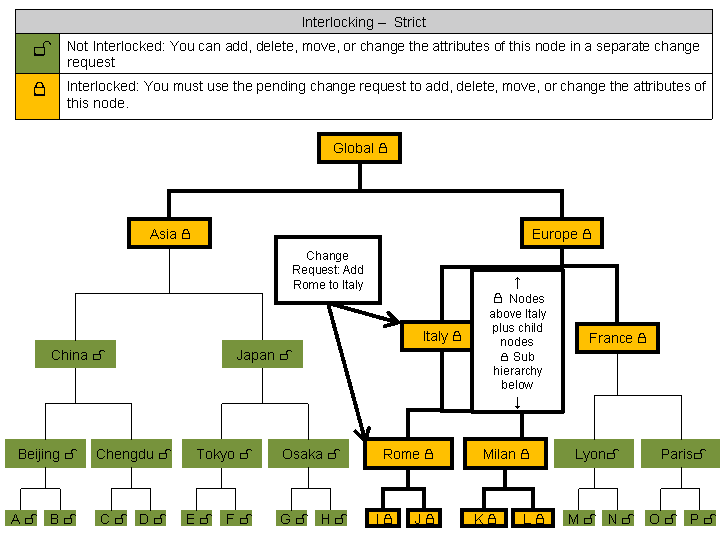
Interlocking - Strict
Upwards Interlocking
All nodes in the path from Italy to Global are interlocked. The child nodes of these nodes are also interlocked. Affected nodes include the following:
Italy (parent node), Rome and Milan (child nodes)
Europe (parent node of parent node), France and Italy (child nodes)
Global (root node), Asia and Europe (child nodes)
Downwards Interlocking
All nodes in the subhierarchy below Italy are interlocked. Affected nodes include the following:
Cities Rome and Milan, which are below country Italy (Also covered by upwards interlocking)
Teams I and J, which are below city Rome
Teams K and L, which are below city Milan
Any other nodes that might be added in the future to any nodes descending from Italy