 Enterprise Search
In SAP Master Data Governance you can use Enterprise Search to search for master data in the staging area and the active area.
Features
The standard system contains the following default search application and access class in Customizing for Master Data Governance, Central Governance
under 
SAP Customizing Implementation Guide

Cross-Application Components
Processes and Tools for Enterprise Applications
Master Data Governance, Central Governance
General Settings
Data Quality and Search
Define Search Applications
 :
:
Search Application | Access Class |
|---|---|
|
|
The following additional search options are available for Enterprise Search:
Free text search
Fuzzy search
When you select the respective checkboxes, two additional fields appear on the Enterprise Search user interface. In the standard system these two checkboxes are selected for search application ES.
Activities
 Note
Note
To use Enterprise Search for SAP Master Data Governance, step one and step two of the procedure must be executed only if you use customer-defined objects. Step three and step four must always be executed.
Search object connector template:
The standard system contains default search object connector templates for Supplier and Material. However, if you want to use customer-defined objects, the following is required:
For every business object type you want to search for, you have to create a search object connector template in Customizing for
Master Data Governance, Central Governance
under SAP Customizing Implementation Guide
Cross-Application Components
Master Data Governance, Central Governance
General Settings
Data Quality and Search
Create Search Object Connector Templates
.You then assign your search object connector templates to your business object types in Customizing activity
Assign Search Object Connector Templates to Object Types
.The standard system contains the following default assignments:
Business Object Type
Search Object Connector Template
986 (Business Partner Relationship Process Control)
MDG_BUSINESS_PARTNER
194 (Material)
MDG_MATERIAL
Search object connector:
In the Connector Administration Cockpit (transaction ESH_COCKPIT) you must create a search object connector based on the respective search object connector template and software component.
 Recommendation
On the detailed screen for the search object connector template, go to the
Schedules
tab page and enable real-time indexing.End of the recommendation.Search index:
In the Connector Administration Cockpit you have to execute the following:
Initial data load for indexing the data for your search object connector(s).
Schedule the delta update of the search index so that the Enterprise Search is regularly updated with the master data that has been changed in the meantime.
The concept of Enterprise Search for SAP Master Data Governance described above is shown in the following figure:
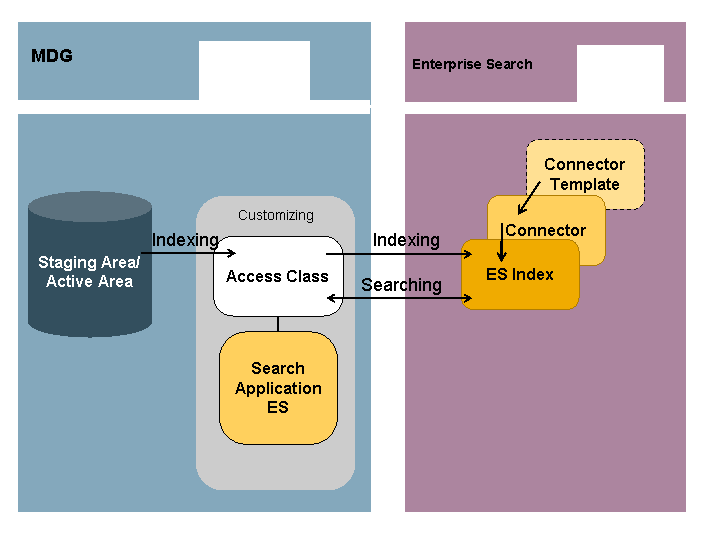
Enterprise Search for SAP Master Data Governance