 Information: Car Rental Availability: Vehicle
List
Information: Car Rental Availability: Vehicle
List 
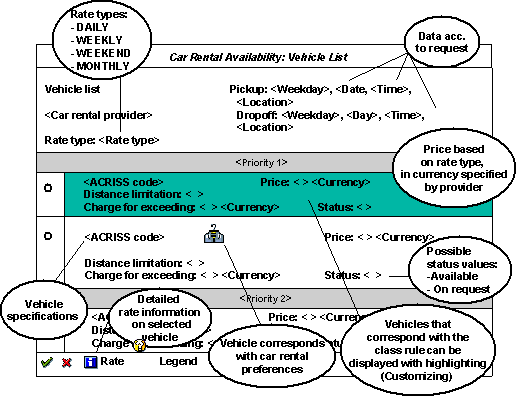
In the Car Rental Availability: Vehicle List dialog box you can see the currently available vehicles of the specified provider at the pickup location for the relevant time period. The list is sorted by rental price and possibly by priority, in ascending order. The list also uses special optical indicators to give you information as to which vehicles correspond to your car preferences and possible class rules for car rentals as specified in Customizing and valid for your travel profile (see Customizing for R/3 Travel Planning under Trip Rules and Profiles).
You can choose a vehicle here that will be copied to your travel plan in status Requested. The system then waits for confirmation by the provider.
In the dialog box you can find the following information:
Legend
|
Rate type |
Car rental rate depending on time period. The following rates are distinguished: DAILY, WEEKLY, WEEKEND, MONTHLY |
|
DAILY |
Price per day. The “day” interval can last a maximum of 24 hours and 59 minutes. |
|
WEEKLY |
Flat rate for a time interval of at least 5 days. |
|
WEEKEND |
Weekend rate, which applies per day. For this rate there are the following requirements: - Rental duration of 1 to 4 days - Pickup by customer after 12 noon from Thursday to Sunday - Drop-off by customer by 12 noon Monday - There is a Friday, Saturday or Sunday within the rental duration |
|
MONTHLY |
Daily or flat rate price for a total rental duration of at least 28 days. The customer is not obligated to rent the car for longer than 31 days. |
|
ACRISS code |
Industry-specific code describing vehicle specifications with regard to following criteria:
-
Vehicle
class
-
Vehicle
type
-
Transmission type
-
Air-conditioning The relevant codes are named in this order first in the vehicle description and then decoded in text. |
|
Price |
Price specification on the basis of the rate type. The price is displayed in the currency defined by the car rental provider. |
|
Distance limitation |
Specifies whether a distance limitation applies for this car rental rate (in miles or kilometers). The categories are displayed as follows: -
UNL (unlimited) -
Three-digit number and 'M' or 'K' |
|
Charge for exceeding |
The amount the customer must pay per additional mile or kilometer driven if the distance limitation is exceeded. |
|
Status: On request |
For technical reasons, the reservation option for the vehicle can not be guaranteed by the car rental provider. If the system successfully selects the vehicle, you receive a success message and the car rental request is shown in your travel plan in the status Requested. |
|
Status: Available |
The vehicle is available for reservation. |
