

 Information: Hotel Availability: Hotel List
In the
Hotel Availability: Hotel List dialog box you can see a list of hotels available at the specified location, sorted alphabetically by hotel name.The reservation system Sabre offers you in a first list of results as many as 26 hotels for selection that were chosen at random by the reservation system. If you use Amadeus and no special rate agreements with hotels exist (see Legend: Negotiated Hotel Rates), the initial list includes up to 30 hotels. You can display more hotels (depending on availability again up to 30 or 26 hotels) using the relevant pushbutton.
You can select a hotel in the list and the
Hotel Availability: Room List dialog box appears.In the
Hotel Availability: Hotel List dialog box you can find the following information.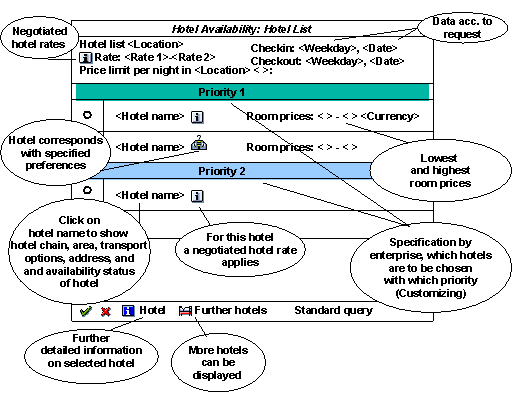
Legend
Negotiated hotel rates |
If your company or your travel agency has negotiated special rates with hotel chains and they are stored in the Cusomizing settings, the rate codes are displayed here. In an availability query the system checks to see if negotiated rates are known by the reservation system and if there are offers that correspond with these rates. If the reservation system Amadeus is used, only hotels that offer negotiated rates are displayed in the results list. The Further hotels pushbutton is inactive in this case. Via Standard query you can start a general availability query in which hotels for which there are no rate agreements are also considered. If Sabre is used, hotels for which special rate agreements apply are indicated by an icon. The rate that applies in each case can be seen in the quick info text that appears when you leave the cursor on the relevant icon for a few seconds. |
Price limit |
If a price limit has been stored in your Customizing settings, the maximum amount that must/should not be exceeded for an overnight stay at the selected location is displayed here. The price limit is not yet applied in the display of hotels in the hotel list. When the room list is displayed, however, the price limit is considered in the way specified in your Customizing settings. Therefore, in the availability list, rooms priced higher than the maximum amount can be:
|
Room prices |
The highest and the lowest price for a room available in the hotel are displayed. |
Currency for room price |
The room prices for connection with reservation system Amadeus are displayed in hotel currency, for connection with Sabre in the currency used by the travel agency. |