
 Seasonal
Procurement
Seasonal
Procurement

Use
In the Seasonal Procurement component, you process purchasing processes that are specially designed to suit the requirements of seasonal procurement of retail goods, for example, from the area of fashion.
You process data from planning applications or enter unplanned purchase order data manually in this component.
One of the main target groups is employees who plan and procure (seasonal) articles that are not generally replenishable and will only be procured once. As there is often a very long period of time between budgeting for, ordering, and the actual delivery of the goods, the component contains an Order Manager, which in addition to functions for creating and processing purchase orders, also incorporates an automatic application for long-term scheduling and several applications for procurement monitoring.
Integration
The following graphic shows the systems involved.
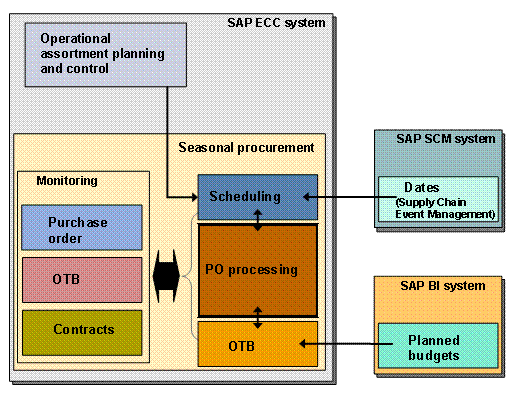
Seasonal Procurement processes planning data from the ERP system itself, such as data from operational assortment planning and control (OAPC), and planning data that can be transferred to the ERP system from external systems. This includes data from SAP Supply Chain Event Management and planned budgets from SAP BI.
Using the monitoring components in the ERP system, you can monitor whether the strategic rules for dates, budgets, and contracts are adhered to.
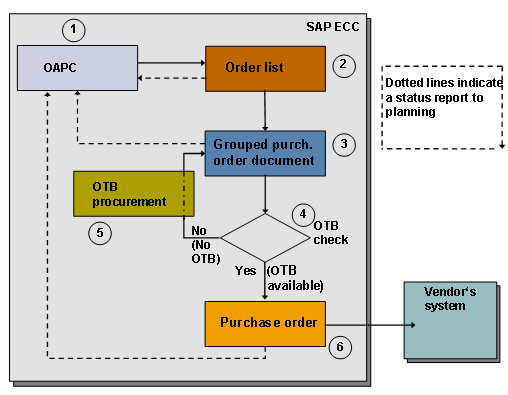
The following graphic provides a simplified view of the complete process.
...
1. In the OAPC application, you plan which quantities of which articles should be available at a certain point in time in the assortment in your store or distribution center, and transfer these items to the order list.
2. The system collects potential purchase order items in the order list and creates an initial worklist of purchase orders to be generated.
From the order list you create either grouped purchase order documents or purchase orders. The order list reports the changed processing status of the item to OAPC planning and then the grouped purchase order document and the purchase order also return the status and document changes (quantity, date, site).
3. In the grouped purchase order document, the system groups the items according to fixed (for example, vendor) and variable criteria (for example, by site) into temporary, internal documents.
If there is sufficient budget available, you can generate purchase orders from the grouped purchase order documents.
4. The OTB check analyzes whether there is sufficient budget available for the whole document or for each item.
It is not only possible to carry out an OTB check from the grouped purchase order document, but also when you generate the purchase order from the order list.
5. You can use OTB procurement to procure available budget for a document that received a negative result in the OTB check.
6. If there is insufficient budget available, you cannot create a purchase order. By changing other documents, for example, and taking over their budget, you can bring about a positive OTB check result.