

Graphic: Assignment to Group Asset by Depreciation Area
The following graphic shows the assignment of an asset to different group assets in different depreciation areas:
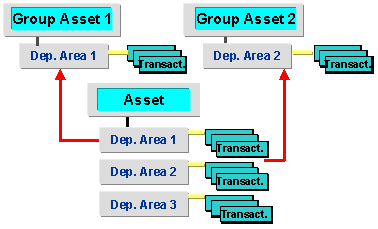

Note that when you enter a group asset in a depreciation area of an asset, that this entry is duplicated in all depreciation areas in the asset that are also managed at group asset level. This means that the assignment of an asset to different group assets for different depreciation areas is only possible if the group assets do not have any common depreciation areas.