
 Creation of Inbound Delivery

Use
You can use this function to create an inbound delivery in SAP ERP. This can take place directly based on inbound delivery data (for example, from the user interface) from the advanced shipping notification (ASN) that you have received. An ASN announces a physical transport of goods from the vendor (ship-from location) to the recipient (ship-to location).
SAP ERP Extended Inbound Delivery Processing differentiates between the following:
● New ASN/inbound delivery (creation of inbound delivery)
● Split ASN/inbound delivery (request for delivery split)
Prerequisites
· ASN or inbound delivery data has arrived in one of the following ways:
○ By IDoc from the vendor
○ By IDoc from SAP SNC
○ By qRFC (queued Remote Function Call) from SAP EWM
○ From the user interface
· SAP ERP has validated the ASN
Features
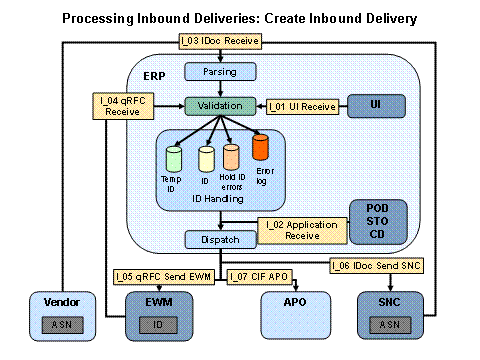
The following figure illustrates the creation of an inbound delivery (new ASN scenario):
Activities
The ASN data arrives from the vendor or SAP SNC by an IDoc interface, from SAP EWM by qRFC or by the user interface.
SAP ERP checks the consistency of the data it contains in a validation framework. If the validation framework of SAP ERP detects errors or the data is inconsistent or incorrect in any way, the system sets the status of the ASN to Hold and a message is saved to the SAP ERP Extended Inbound Processing application error log. The system then filters and dispatches the message to the appropriate connected systems. This process is repeated as often as required until SAP ERP is in a position to create an inbound delivery free of errors. In Customizing for Integration of Extended Warehouse Management under Extended Inbound Delivery Processing → Configure Inbound Validations you can make settings to define whether an error is acceptable or not.

If a new item is added to an inbound delivery and this item is incorrect, then only this item receives the status On Hold; the other items in the inbound delivery retain the status Real. Nevertheless, the system displays the entire inbound delivery as On Hold in the transaction Extended Inbound Delivery Processing. In other words, if any one item of an inbound delivery is On Hold, the system displays the entire inbound delivery as On Hold.
If no errors are detected and the ASN is complete and correct, SAP ERP creates an inbound delivery with the status Real, which it then forwards to SAP EWM, SAP SNC, and SAP APO. An appropriate message is sent to the application log, from where it is then dispatched to the connected systems. For more information on this, see Dispatching. If the inbound delivery data arrives in SAP ERP from SAP EWM, the inbound delivery is created by means of qRFC interface.
After SAP ERP has received and validated the inbound delivery data, it generates an inbound delivery. An inbound delivery is the SAP ERP system-internal representation of the advanced shipping notification. It then forwards this inbound delivery to SAP EWM in order to trigger the goods receipt process by creating a warehouse request. SAP ERP forwards data to SAP APO for planning purposes and replicates this data to SAP SNC.
If SAP ERP does not receive its data from SAP SCM or the vendor has not sent an ASN per EDI, you may wish to create the inbound delivery manually on the user interface.
In other words, there are two options for creating an inbound delivery:
· Manually in SAP ERP by choosing Logistics → Logistics Execution → Inbound Process → Goods Receipt for Inbound Delivery → Extended Inbound Delivery Processing (transaction code vl60, single maintenance), or by choosing Logistics → Logistics Execution → Inbound Process → Goods Receipt for Inbound Delivery → Extended Inbound Delivery Processing → Generation of Inbound Deliveries (transaction code vl64, mass maintenance for generating inbound deliveries from purchase orders or scheduling agreements), or in SAP EWM or SAP SNC.
· Automatically, in which case the vendor, SAP SNC, or SAP EWM sends an ASN by EDI.
Result
The inbound delivery has been created and the subsequent goods receipt process can take place.