 Gross Up


Gross Up
Use
Gross up is one of the
paid conditions used in Thailand. With gross up, you pay the vendor the entire sum owed, and in addition, you pay an extra amount of withholding tax on their behalf, out of your own pocket. The tax burden is yours. See the example below.The gross up procedure shifts the tax burden from the vendor to the paying company. It is used in situations where the vendor is not to be penalized.
Activities
Customizing
It is the withholding tax codes that control whether tax is grossed up.
Define the withholding tax codes in Customizing for Financial Accounting (FI), by choosing Financial Accounting Global Settings → Withholding Tax → Extended Withholding Tax → Calculation → Withholding Tax Codes → Define Withholding Tax Codes. Set the posting indicator in the tax codes to 2 (Gross Up)
Specify which G/L account the system posts the grossed-up tax to in Customizing for FI, by choosing Financial Accounting Global Settings → Withholding Tax → Extended Withholding Tax → Postings → Accounts for Withholding Tax → Define Accounts for Grossing Up Offsetting Entry.
Example
Assume that you have an invoice from a vendor for THB 1,000, and that the withholding tax rate is 5%. When you pay the invoice, the system posts an accounting document as follows:
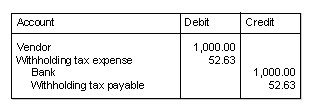
As you can see, the system pays the vendor the THB 1,000 in full from your bank account. It also pays the tax on the vendor's behalf by debiting the withholding tax not to the vendor, but to a separate expense account.
The total amount that you effectively pay to the vendor is THB 1,052,63. When the vendor declares this amount to the Revenue Department, it will be liable to the usual rate of income tax, 5%, which works out at THB 52.63:
1,052.63 ´ 5% = 52.63
That means that the vendor has to pay THB 53.63 in tax, but is still left with the original THB 1,000 that you owed it. That means that you have in effect paid for the tax.