Collective Purchase Order: Selection and Scheduling


Collective Purchase Order: Selection and Scheduling
Use
When a collective purchase order is generated, the system first finds the relevant issue document items (warehouse order items or sales order items) whose schedule line quantities should be aggregated. You enter a procurement period and can set an indicator to include backorder documents to determine which issue document items are relevant. The system uses scheduling functions from the area of Logistics Execution to calculate the delivery generation date of the schedule lines in the issue document items.
The schedule line interval you enter also affects how the system calculates the schedule line dates and quantities in the collective purchase order items. In generating collective purchase orders, you can specify on the initial screen whether the system should schedule in working days or calendar days.
Prerequisites
Before you can generate collective purchase orders, the master data must be maintained as follows:
A distribution profile must be entered in the Purchasing/distribution data.
A distribution profile must be entered in the distribution center logistics data.
Process Flow
The system searches for all issue document items where the delivery generation dates (date and time) of all the schedule lines is within the procurement period. Delivery generation dates that are at the start or end of the procurement period are considered as being within the period.
The generation date is either the date of article staging or the date of transportation planning, whichever is earlier. It is determined in collective processing of due documents. For further information, see
 Scheduling Transportation and Shipping.
If you do not want to include any backorder documents, the system assumes that the goods receipt is complete at the beginning of the distribution process. It therefore only selects issue document items for which the following requirements apply:
(Note: replenishment lead-time = planned delivery time + goods receipt processing time)
If you want backorder documents included, the system does not check the replenishment lead-time.
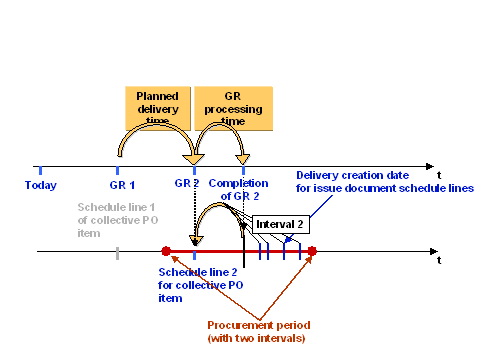
After the system has determined the relevant issue document items, it calculates the schedule lines dates of each collective purchase order item as follows:
The following graphics show an example of the procurement period split into two intervals. For each of the two intervals, the issue document schedule lines are combined in a collective purchase order item.