
 The Object Selector Dialog at a
Glance
The Object Selector Dialog at a
Glance

The object selector dialog is used to select the objects to link to an object lookup field in a main or subtable record. The dialog is similar for every type of object lookup field. It includes three panes, which may be resized by dragging the 4-headed arrow that separates them.
To open the object selector dialog:
In the Record Detail tab, double-click on an object lookup field to open the object selector dialog (figure below).
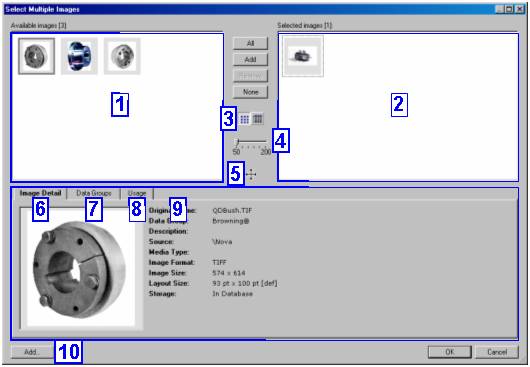
The object selector dialog consists of the panes and tabs shown in the numbered callouts of the figure above, listed below and described in the following sections:
...
1. Available Objects pane
2. Selected Objects pane
3. Toggle View toolbar buttons
4. Slider
5. Resizer
6. Object Detail tab
7. Data Groups tab
8. Usage tab
9. Filters tab
10. Add button