
 The
Object Lookup Field at A Glance
The
Object Lookup Field at A Glance

On a main or subtable record, the object lookup field is where the link to an object (or objects if the lookup field is multi-valued) is stored. The linked object’s thumbnail or content is displayed in the object lookup field cell, which appears on the right-hand side of the Record Detail tab.
Right-clicking in the object lookup field cell opens a context menu containing link-related commands as well as the commands available for the linked object’s type, as shown in the figure below.
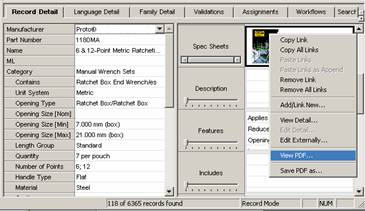

You must right-click on an object’s thumbnail or contents to enable the object-related commands on the context menu.