
 The Qualified Lookup Field Cell

Use
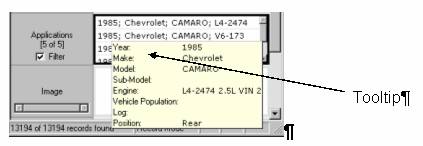
Each linked qualified table record is displayed on its own row inside the qualified lookup field’s cell. By holding the mouse over a record in the qualified lookup cell, you can quickly view the details of that qualified table record. MDM displays the details in a tooltip that contains the values for each of the linked qualified table record’s fields and qualifiers, as shown in the figure below.
You can also view and edit qualified record details by right-clicking on the record in the qualified lookup cell and selecting View/Edit Detail… from the context menu. This opens the Qualified Lookup Detail dialog (figure below).
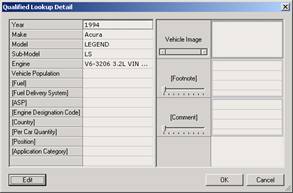
The Qualified Lookup Detail dialog displays the field and qualifier values of the selected qualified table record. For easy identification, qualifier names are enclosed in square brackets ([ ]).
From the Qualified Lookup Detail dialog, you can also edit the qualifier values of the selected qualified table record.
Procedure
To edit the qualifiers of a linked qualified table record:
...
1. From the Record Detail tab, right-click on a qualified table record in a qualified lookup field cell and choose View/Edit Detail… from the context menu.
2. From within the Qualified Lookup Detail dialog, click the Edit button to enable the edit controls, and edit the qualified table record qualifier values.
