
 Qualified Lookup Search Tabs

If the qualified table itself contains lookup fields (and qualified tables usually do), the search tab for a qualified lookup field includes two additional subpanes that list each of the lookup fields of the qualified table itself and, for each qualified table lookup field, each of its values, as shown in the figure below. The nested lookup fields support multi-level “search-within-a-search,” which allows you to first do a pre-search that narrows down the set of qualified table records to a manageable number before selecting a qualified table record.
In addition, just as you can search for a product by category, and then refine and narrow the search by selecting the values for one or more category-specific attributes, you can search for a product by qualified table record, and then refine and narrow the search by selecting the values for one or more qualifiers.
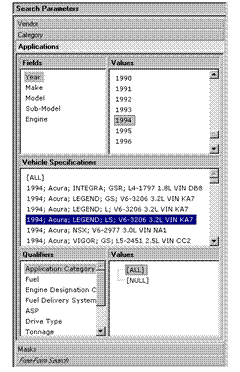

Each of the lookup fields of the qualified table is automatically promoted into the qualified lookup search tab of the main table, regardless of whether or not it is a display field.
In a qualified lookup search tab, you can select values only for cached lookup qualifiers before selecting a qualified table record; for non-cached lookup qualifiers, you must explicitly select a qualified table record before the qualifier even appears in the Qualifiers subpane.
As you select each nested lookup field in the Lookups subpane, the list of values in the Valuessubpane next to it changes to correspond to the set of values for the selected nested lookup field.
As you select each qualifier in the Qualifiers subpane, the list of values in the Valuessubpane next to it changes to correspond to the set of values for the selected qualifier.
Like all MDM drilldown searches, multi-level search-within-a-search is omnidirectional; that is, you can make nested lookup field value selections in any order and intermingle them with selections made from other search dimensions. In an automotive parts repository that supports product applications and application-based search, this eliminates the rigid “year/make/model/engine” search sequence.