
 Changing Attribute Priority

Use
Recall that unlike the other properties of an attribute, which apply across all the categories to which the attribute is linked, priority can be set on a category-by-category (link-by-link) basis. In other words, the same attribute may have different priorities for different categories, to reflect the different importance it might have for each category.
Prerequisites
To set the priority of one or more linked attributes to a named priority:
1. In the Attributes pane, select the linked attribute(s) whose priority you want to set.
2. Right-click on one of the attributes and choose Priority from the context menu, or choose Attributes ® Priority from the main menu.
3. Choose one of the named priorities from the cascading menu:
¡ Highest
¡ High
¡ Normal
¡ Low
¡ Lowest
MDM changes the priority of the selected attributes.
To set the priority of one or more linked attributes to a numeric priority (for finer control over the ordering of attributes):
...
1. In the Attributes pane, select the linked attribute(s) whose priority you want to set.
2. Right-click on one of the attributes and choose Priority from the context menu, or choose Attributes ® Priority from the main menu.
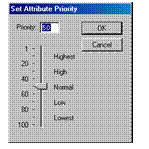
3. Choose Custom Value from the cascading menu to open the Set Attribute Priority dialog shown in the figure below.

You cannot specify numeric priorities unless the
Allow Custom Priorities option has been enabled (for more
information about the Allow Custom Priorities option, see
 Configuration
Options).
Configuration
Options).
4. Type a number from 1 through 100, or use the slider to adjust the numeric priority.
5. Click OK when you are done to close the Set Attribute Priority dialog.
MDM changes the priority of the selected attributes.
Operation |
Constraints |
Set Priority |
· Must be in Taxonomy mode · Attributes pane must have focus · At least one attribute must be selected · The selected node cannot be an alias · The current configuration options must allow custom priorities · All of the selected attributes must be linked to the selected node |