
 Common Properties

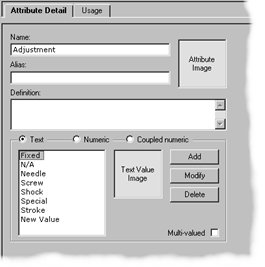
The properties that are common to every attribute are described in the following sections (figure below).
Attribute Name
Every attribute must have a unique name. The Name property of the Attribute Detail tab is a standard Windows edit control for data entry.
Attribute Alias
Use the Alias property to assign alternate names to the attribute, which can be found using the Find command or using keyword search on the Web. The Alias property of the Attribute Detail tab is a standard Windows edit control for data entry.
Attribute Definition
Use the Definition property to provide a detailed description of the attribute, which is available when you publish the repository to paper or to the Web, and can also be useful for searching with the Find command. The Definition property of the Attribute Detail tab is a standard multi-line Windows edit control for data entry.
Attribute Image
Use the Attribute Image property to associate an illustrative image with the attribute, which is available when you publish the repository to paper or the Web. The Attribute Image property is an MDM image lookup field; double-click on it to open the Select Single Image dialog and assign an image.

The steps for adding and removing an Attribute Image are essentially identical to those for product images presented under, except that you can only select a single image.
Multi-Valued Option
Any MDM attribute can be defined as being multi-valued, so that it can be used to store multiple values. The Multi-Valued option is a standard Windows checkbox; click on it to toggle the setting on and off.
Multi-valued attributes make the structure of an MDM repository dramatically simpler, more compact, and more searchable, by allowing you to store all the values corresponding to a particular data element in the same place. The alternative is having to create multiple attributes, in some cases up to a maximum of one attribute for each possible value.