Moving a Category with
Drag-and-Drop
Moving a Category with
Drag-and-Drop

Use
There is no explicit command to move a category from one location to another in the taxonomy tree. Instead, you can drag-and-drop a category to move it, with certain restrictions as explained below.

You can also use the Cut and Paste commands to move categories in the taxonomy tree, as described in the section below.
When you drag-and-drop a category, a context menu automatically pops up when you drop it. The context menu prompts you to choose whether to insert the dragged category as a sibling or as a child of the target category (figure below), or alternatively, to merge the dragged category into the target category (as described in the next section).

Procedure
To move a category from one location in the tree to another:
...
1. In the taxonomy tree, select the category you want to move.
2. Drag the selected category to the new location in the tree.
3. Choose one of the insert options from the context menu that pops up when you drop the dragged category onto the target category (figure above):
¡ Insert as Sibling (inserts as a sibling just before the target)
¡ Insert as Child (inserts as the last child of the target)
MDM removes the node from its former location and inserts it into the tree as specified by the option you chose in step 3. However, if MDM detects a condition that would result in data integrity loss if the move were completed, MDM displays a message explaining why the move is not allowed, as described in the Data Integrity notes below.
To bypass the pop-up context menu, hold Shift (to Insert as Sibling) or Ctrl (to Insert as Child) while you perform the drag-and-drop.
Sibling nodes in a tree cannot have the same name. When you drag-and-drop a node to move it in the tree, MDM automatically renames it to Node Name (n) if its name would be the same as that of an existing sibling node in the new location (where ‘n’ is the first available numeric value that will avoid a conflict).
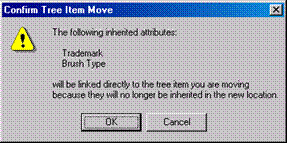
When you move a category in the taxonomy tree, MDM automatically detects differences in the inherited attributes in the old and new locations, and if necessary: (1) links directly to the category those attributes that were inherited but will no longer be inherited in the new location (figure below); and/or (2) unlinks from the category those attributes that were linked directly but will be inherited in the new location (second figure below).

Drag-and-Drop Move Category Constraints
Operation |
Constraints |
Insert as Sibling |
· Must be in Hierarchy or Taxonomy mode · Tree must have focus · Root node cannot be moved · Root node cannot have siblings · Sibling nodes cannot have the same name |
Insert as Child |
· Must be in Hierarchy or Taxonomy mode · Tree must have focus · Root node cannot be moved · Destination node cannot be an alias · Destination node cannot have an alias · Destination node cannot have a matching set · Destination node value cannot currently be assigned to a lookup field · Sibling nodes cannot have the same name |
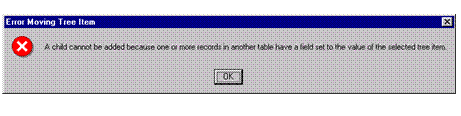
For proper organization of the records within an MDM repository, a taxonomy lookup field can normally be assigned only to the value of a leaf-node category in the taxonomy table, which can sometimes prevent a tree operation that would otherwise turn a leaf node into a parent node. However, MDM does not detect if records have already been assigned to a leaf-node category until after you attempt to perform the operation. As a result, the Insert as Child menu item is available even if the destination category has records assigned to it, even though this would turn it into a non-leaf node. If you choose Insert as Child in this situation, MDM does not permit the insert and instead displays the error dialog shown in the following figure.