
 Taxonomy Mode at a Glance

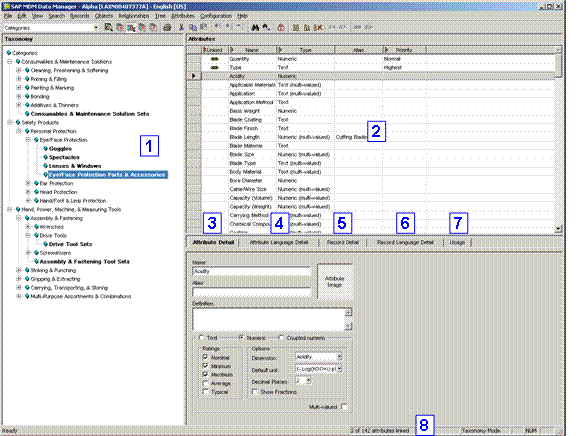
The Taxonomy mode main window:

If you want to
simply review the taxonomy and wish to avoid any accidental changes, you can
put the MDM Client into read-only mode by clicking on the Read-Only toolbar button  , or
by choosing View ® Read-Only from
the main menu.
, or
by choosing View ® Read-Only from
the main menu.
The main window of Taxonomy mode consists of the panes and tabs shown in the numbered callouts of the figure above, listed below and described in the following sections:
...
1. Taxonomy pane
2. Attributes pane
3. Attribute Detail tab
4. Attribute Language Detail tab
5. Record Detail tab
6. Record Language Detail tab
7. Usage tab
8. Status bar