
 Working
with Taxonomy Tables
Working
with Taxonomy Tables

Taxonomy mode is used to manage the product classification structure defined by the category records and the associated attributes of a taxonomy table. When you view a taxonomy table in Taxonomy mode, MDM uses a tree to display the category records of the table as a hierarchy of categories and subcategories, and a grid to list the entire pool of attributes that are associated with the taxonomy table.
In Taxonomy mode, you can create and manage the category hierarchy, create and manage the pool of attributes, and assign attributes to categories on a category-by-category basis.
Taxonomy mode also provides powerful functionality that allows you to flexibly restructure the taxonomy of a fully populated MDM repository so that you can continue to refine your taxonomy even after it contains detailed information on thousands or even millions of objects.
To switch to Taxonomy mode:
Click the Taxonomy Mode toolbar button, or press Ctrl + 3, or choose View ® Taxonomy Mode from the main menu.

Taxonomy mode is unavailable if the repository contains no taxonomy tables.
To specify the current table:
Click on the drop-down table list (figure below) or press F4, and select the taxonomy table whose categories and attributes you want to view and edit.
Alternatively, choose View ® Table from the main menu and choose from the cascading menu of tables.
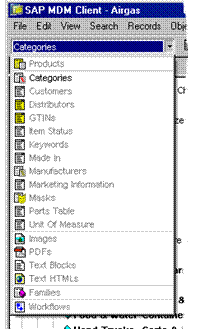
Only taxonomy tables are available in Taxonomy mode.
When you start the MDM Client and change to Taxonomy mode for the first time, it automatically selects a taxonomy table to be the current table. It then remembers the current table selection for each mode as you change the current table in each mode and move back and forth between modes.