
 Hiding and Unhiding Nodes

Use
The MDM Client's Hide Children command provides a method for hiding hierarchical detail from end users of the repository while retaining the detail information for the MDM Client operator.
For example, you may have products that are made by two divisions of one company. Even though you store the division information in the repository, you may want to “hide” this detailed information and instead identify the products as being from the same (parent) company.
The effect of Hide Children is to make all products assigned to the children of a given parent node appear to be members of that parent node for searching purposes; hidden child nodes do not appear at all in the Search Parameters tab in Record mode (figure below).

When you hide the children of a node, the affected child nodes are highlighted in gray in the hierarchy tree (figure below).
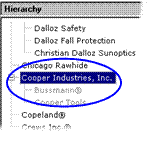

You can turn
off the gray display of tree nodes that have been hidden (for more information
about the Trees options, see
 Configuration
Options).
Configuration
Options).
When a search is performed using the parent of hidden children, products associated with the child nodes appear in the Records pane as being associated with the parent node directly. However, the Record Detail pane will identify the “hidden” child node in square brackets (figure below).

Procedure
To hide the children of a node:
...
1. In the hierarchy tree, select the node whose children you want to hide.
2. Right-click on the node and choose Hide Children from the context menu, or choose Tree ® Hide Children from the main menu.
MDM highlights all of the descendants of the selected node in gray to indicate that they have been hidden.
Hide Children is a toggle. A check mark next to the Hide Children menu item indicates that it is turned on.
To unhide child nodes that had previously been hidden:
...
1. In the hierarchy tree, select the node whose children have previously been hidden.
2. Right-click on the node and choose Hide Children from the context menu, or choose Tree ® Hide Children from the main menu.
MDM once again displays all of the descendants of the selected node in black to indicate that they are no longer hidden, and removes the check mark from the menu item.
Operation |
Constraints |
Hide Children |
· Must be in Hierarchy or Taxonomy mode · Table cannot support families · Tree must have focus · Exactly one node must be selected · Root node cannot have hidden children · Node cannot be an alias · Node cannot have an alias |