
 Linked
and Inherited Attributes
Linked
and Inherited Attributes

When you view a taxonomy table in Taxonomy mode, MDM displays the category hierarchy as a tree in the Taxonomy pane, and the pool of attributes associated with the taxonomy table in the Attributes pane.
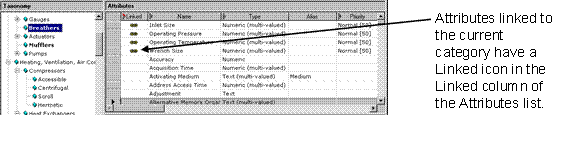
In MDM, attributes are associated with – linked to – categories. Categories in the tree that have attributes directly linked to them are highlighted in bold. Similarly, attributes that are linked to the selected category in the tree are displayed in the Attributes pane with a “linked” icon in the Linked column of the grid (figure below).

You can turn
off the bold display of tree nodes that have linked attributes (for more
information about the Display options see
 Configuration
Options).
Configuration
Options).
Attributes can also be inherited. If the linked icon is gray and has a superscript number next to it, this indicates that the attribute is not linked directly to the selected category but rather to one of its ancestors in the tree; the number indicates the level of inheritance.

For example, “1” means that the attribute is inherited from one level up; that is, it is linked to the parent of the selected category. A “2” superscript means that the attribute is inherited from two levels up, and so on.
If you sort the Attributes pane by the Linked column, the attributes will always be listed with the linked and inherited attributes at the top of the list; in effect, they will always float to the top as you move from category to category in the taxonomy tree.
To set the Attributes pane to display only those attributes that are linked to or inherited by the selected node in the taxonomy tree, choose Attributes ® Linked Attributes Only from the main menu. This command is a toggle; to restore the display of all attributes to the grid, choose the Linked Attributes Only command again.
You can only set the priority of an attribute at the level to which it is linked. If an attribute is inherited, you must adjust the priority at the higher level to which it is linked directly.