
 Non-Unique Node Names

Recall that sibling nodes in a tree cannot have the same name. But across the entire hierarchy, the same leaf node name need not be unique, and may even be repeated over and over throughout the tree.
In Hierarchy mode, duplicate node names are not a problem. A node in the hierarchy tree that has a non-unique name can be uniquely identified in the context of its ancestors. Similarly, the hierarchy field value in the Records pane that corresponds to a non-unique node name in the tree can also be uniquely identified, because the Records pane and the Hierarchy pane track each other, and once again, you can see the corresponding node in the tree in the context of its ancestors.
However, a problem arises if you are viewing a non-unique hierarchy lookup field value in the Records pane in Record mode rather than in Hierarchy Mode. Since there is no hierarchy tree for context, all you can see in the Records pane is the non-unique leaf node value, so you cannot distinguish one non-unique value from another.
MDM solves this problem in Record mode by distinguishing non-unique leaf node names in the grid of the Records pane. If the value of a hierarchy lookup field is not unique, MDM automatically appends to the value in angular brackets enough of its ancestry to create a unique node name that uniquely identifies the value (figure below).
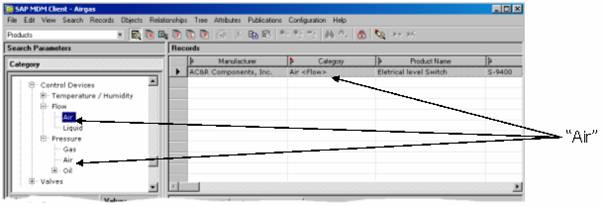

For example, in the figure above, there are two nodes named Air in the tree; one is a child of the Flow node, and the other is a child of the Pressure node. The Air node that is a child of Flow is displayed in the Records pane as Air <Flow> in the Category column, as shown in the figure. Similarly, the Air node that is a child of Pressure would be displayed as Air <Pressure> in the Records pane.
Don’t worry; the value of the field hasn’t changed, only the way it is displayed in the Record mode Records pane. In this way, when you select a record or sort by the column that contains the hierarchy lookup field, you can easily distinguish between different instances of the same non-unique value and see where in the hierarchy they originated.

MDM also uses unique node names as one of the Hierarchy Field Format options in the record export.
MDM does not indicate unique node names in the Record Detail grid because, if necessary, you can open the drop-down tree control to see the tree node that corresponds to a hierarchy lookup field value.