
 Editing Hierarchy Lookup Tables

A hierarchy lookup table defines the hierarchy of legal values that appear in the drop-down list when you edit a hierarchy lookup field. An example of a hierarchy table displayed in Record mode is shown in figure below.
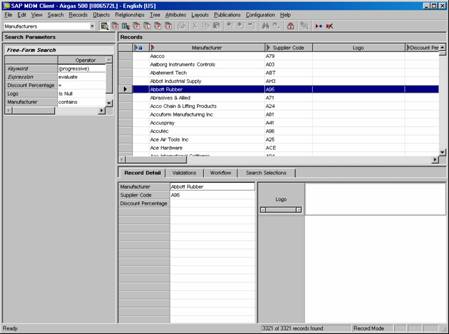
In addition to the lookup field value, each record may also contain other fields of information that further describe each lookup value (such as the Supplier Code, Discount Percentage, and Logo fields in the Record Detail tab in the figure above).

Although you can view, add, edit and delete the records of a hierarchy table in Record mode, you should usually edit a hierarchy table in Hierarchy mode so that you can view and edit the hierarchical relationships in addition to the other fields of each record.
To merge hierarchy lookup table records, use drag-and-drop or the Cut and Paste as Merge commands in Hierarchy mode. (See Merging Nodes with Drag-and-Drop for more information about merging hierarchy table lookup records).