
 Task
Completion Commands
Task
Completion Commands

When you are done performing the action required by a task, you can indicate your completion using four different MDM workflow commands, only one of which will be enabled by MDM at any given time based upon the particular circumstances of the workflow.
For some of the commands, MDM also displays a single- or multi-level cascading menu that includes the following entries:
· Groups
· Steps
· Roles
· Users
In particular, which levels and elements are included in the cascading menu depends upon whether or not you are the last user to perform a step and/or the Execution Type of the current or next step.
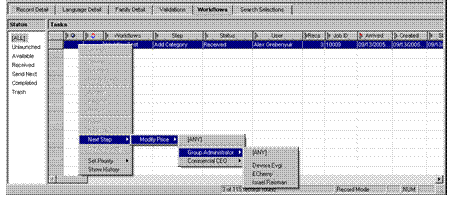
The Next Stepcommand with cascading menus is illustrated in the following figure; the task completion commands are summarized in the table below.
Command |
When Enabled |
Cascading Menu with All Levels |
||||
Done |
Within a step when you are not the final user of the current step and: · Execution Type= All Concurrent · Execution Type= Any Single Between steps when you are the final user of the current step and: · Send Next Step= [Owner] |
None |
||||
Next User |
Within a step when you are not the final user of the current step and: · Execution Type= All Sequential Random · Execution Type= All Sequential Ordered |
Next User > |
[ANY] |
|
|
|
|
——— |
|
|
|
||
|
role 1 > |
[ANY] |
|
|
||
|
|
——— |
|
|
||
|
|
user 1 |
|
|
||
|
|
user 2 |
|
|
||
|
|
: |
|
|
||
|
|
user n |
|
|
||
|
role 2 |
|
|
|
||
|
: |
|
|
|
||
|
role n |
|
|
|
||
Next Step |
Between steps when you are the final user of the current step and: · Send Next Step= [Anyone] |
Next Step > |
group > |
step 1 > |
[ANY] |
|
|
|
|
——— |
|
||
|
|
|
role 1 > |
[ANY] |
||
|
|
|
|
——— |
||
|
|
|
|
user 1 |
||
|
|
|
|
user 2 |
||
|
|
|
|
: |
||
|
|
|
|
user n |
||
|
|
|
role 2 |
|
||
|
|
|
: |
|
||
|
|
|
role n |
|
||
|
|
|
|
|
||
|
|
step 2 > |
[ANY] |
|
||
|
|
|
——— |
|
||
|
|
|
user 1 |
|
||
|
|
|
user 2 |
|
||
|
|
|
: |
|
||
|
|
|
user n |
|
||
|
|
: |
|
|
||
|
|
step n > |
… |
|
||
Previous Step |
Between steps when you are the final user of an Approve step |
Previous Step > group > previous step(s) > user(s) |
||||

[ANY] appears as the first choice in the cascading menus of the Next User and Next Step commands only when there are multiple remaining users, roles, or steps, as applicable.
Choosing the [ANY] user creates a manual pull; choosing one of the named users creates a manual push.