
 Editing Validation Expressions

Use
You can define and edit the validation expression associated with a validation as described in this section.
Prerequisites
To edit a validation expression:
1. If necessary, click on the Validations tab to make it the active tab.
2. In the Validations pane, select the validation whose validation expression you want to edit.
3. In the Properties pane, double-click on the Validation cell to open the Validation Expression dialog (figure below).
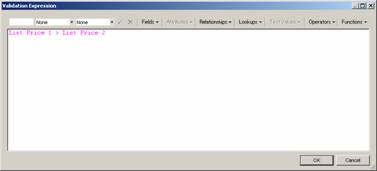

To open the Validation Expression dialog, you can also click the browse button (…) on the far right of the Validation cell.
4. Enter the validation expression using the keyboard and the toolbar buttons to enter values, measurements, field names, attribute names, qualifier names, lookup values, attribute text values, operators, and functions.
5. Click OKto close the Validation Expression dialog.
6. To save the validation, right-click on the Properties pane and choose Save Validationfrom the context menu, or press Shift + Enter.
Try to avoid defining overly complex validations. Instead, each validation should perform just a single test, so it can be debugged quickly and reused in a variety of contexts. Then use validation groups to combine individual validations into sets that can be run at the same time.
For more information, see Validation Groups.