
 Protecting Records

Use
If you have finished editing a record, and want to make sure that it is not inadvertently modified or deleted, either by you or by someone else, you can write-protect it.
MDM highlights
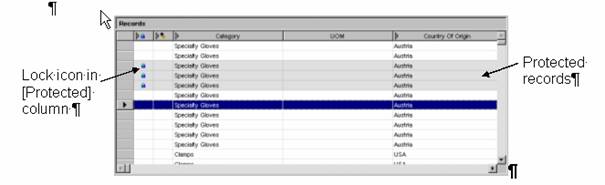
protected records in read-only gray in both the Records pane and the Record Detail
pane, to indicate that they cannot be edited or deleted. It also
displays a lock icon ( ) in the [Protected] column of the Records
grid (figure below).
) in the [Protected] column of the Records
grid (figure below).

You can still edit the relationships of protected records.
MDM automatically protects checked-out records and unprotects them again when they are checked back in (see Checking Out Records for more information).
Procedure
To protect one or more records from editing or deletion:
...
1. In the Records pane, select the record(s) you want to protect.
2. Right-click on one of the records and choose Protection ® Protect from the context menu, or choose Records ® Protection ® Protect Record from the main menu.
3. MDM protects the selected records.
To unprotect one or more records to allow editing or deletion:
...
1. In the Records pane, select the previously protected record(s) you want to unprotect.
2. Right-click on one of the records and choose Protection ® Unprotect from the context menu, or choose Records ® Protection ® Unprotect Recordfrom the main menu.
3. MDM unprotects the selected records.