
 Changing
the Category of a Main Table Record
Changing
the Category of a Main Table Record

When you assign a category value for a main table record, MDM lists the set of attributes linked to that category beneath the category field in the Record Detail tab, so that you can specify values for each of these category-specific attributes.
If you later change the category associated with the main table record, the set of linked attributes may be different than before. If the only attributes listed in the Record Detail tab were those attributes linked to the new category, you might lose data values that had been specified for attributes linked to the old category but not to the new category.
To address this challenge, MDM lists both sets of linked attributes when you change the category associated with a main table record, and highlights the names of the attributes linked to the previous category but not linked the new category in blue, as shown in the figure below.
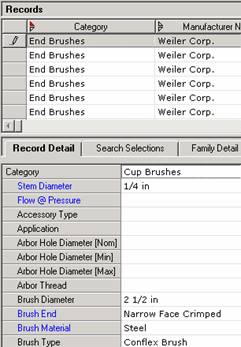
Listing both sets of attributes allows you to remove unwanted attribute values or add missing values. Simply delete the values for any unlinked attributes in blue that you do not want to be automatically linked to the new category.
When you save the record with the new category, MDM automatically links to the new category any attributes in blue for which values are set, so that no values associated with the record will be lost (figure below).
