
 Modifying a Text Attribute Value
List
Modifying a Text Attribute Value
List

Prerequisites
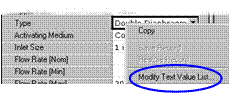
You can modify the list of attribute text values directly from within Record mode when the attribute cell context menu’s Modify Text Value List command is enabled (figure below).
For more information about display options,
see
 Configuration
Options.
Configuration
Options.
Procedure
To modify the text value list for a text attribute:
1. In the Record Detail tab, right-click on the applicable attribute cell, and choose Modify Text Value List from the context menu to open the Modify Text Attribute Value List dialog (figure below).

2. In the Modify Text Attribute Value List dialog, do any of the following:
○ To add a new text value, right-click in the text value list and choose Add from the context menu, or click the Add button, or press Ins. MDM adds a new text value named “New Value” and highlights it for editing. Type the new value, and press Enter.
○ To modify an existing text value, select it in the text value list, and then right-click on the value and choose Modify from the context menu, or click the Modify button, or press F2. MDM highlights the text value for editing. Type the new text value and press Enter.
○ To permanently delete one or more existing text values, select them in the text value list, then right-click on one of the values and choose Delete from the context menu, or click on the Delete button, or press Del. MDM deletes the value(s) without confirmation.
3. Click OK to close the Modify Text Attribute Value List dialog.

The Modify Text Attribute Value List dialog is almost identical to the Attribute Detail tab, except that only the text value list and the Add and Modify buttons are available. If you want to change the other properties of an attribute, go into Taxonomy mode and edit the attribute directly, as described in Adding and Modifying Attributes.
To prevent data loss, MDM will not allow you to delete an attribute text value if it is assigned to the attribute in one or more records. If you choose Delete in this situation, MDM displays an error dialog when you click OK to close the Modify Text Attribute Value List dialog.