
 Saving and Restoring Records

Use
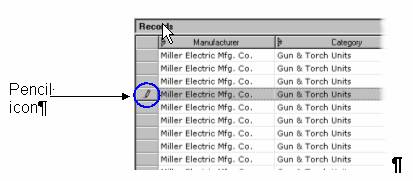
When you first click inside a cell in the Record Detail grid, MDM displays a pencil icon next to the selected record(s) in the Records pane (figure blow) as an indicator of which records are being edited.
Once you actually make changes to the selected records, MDM enables the Save Record and Restore Record commands. Saving a record saves the record changes to the repository. Restoring a record discards all unsaved changes and returns the record to its last saved state.

Once a record is saved it cannot be restored to its previous state.
Procedure
To save changes to the record(s) you are editing:
● Right-click on the Record Detail tab and choose Save Record from the context menu, or
● Choose Records ® Save Record from the main menu, or
● Press Shift+Enter, or
● Move the focus away from the Record Detail tab.
To discard unsaved changes and restore the record(s) to their prior state:
● Right-click on the Record Detail tab and choose Restore Record from the context menu, or
● Choose Records ® Restore Record from the main menu, or
● Press Esc.