
 Qualified Lookup Search Tabs

If the search tab corresponds to a qualified lookup field, the tab is split into as many as five subpanes, as shown in the figure below.
If the qualified table itself contains lookup fields, as described in the previous section, the top left Lookups subpane lists these nested lookup fields and the top right Values subpane contains the list of values for the selected nested lookup field (although these two subpanes are hidden if the qualified table does not contain any lookup fields). The middle subpane contains the list of qualified table records (narrowed down based on the selections of values for the lookup fields of the qualified table). Finally, the bottom left Qualifiers subpane lists the lookup qualifiers, and the bottom right Values subpane contains the list of values for the selected qualifier.
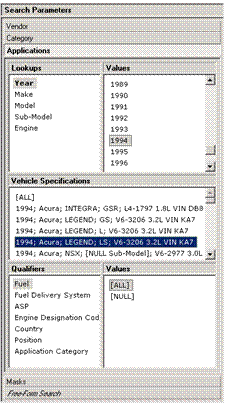

In a qualified lookup search tab, you can select values only for cached lookup qualifiers before selecting a qualified table record; for non-cached lookup qualifiers, you must explicitly select a qualified table record before the qualifier even appears in the Qualifiers subpane.
As you select each nested lookup field in the Lookups subpane, the list of values in the Valuessubpane next to it changes to correspond to the set of values for the selected nested lookup field.
As you select each qualifier in the Qualifiers subpane, the list of values in the Valuessubpane next to it changes to correspond to the set of values for the selected qualifier.