
 Taxonomy Lookup Search Tabs

If the search tab corresponds to a taxonomy lookup field (for example Category), the tab is split into three subpanes, as shown in figure below.
The top subpane contains the hierarchy of category field values. The bottom left Attributessubpane lists the attributes linked to the selected category (or all the attributes, if no category has been selected), and the bottom right Valuessubpane contains the list of values for the selected attribute.
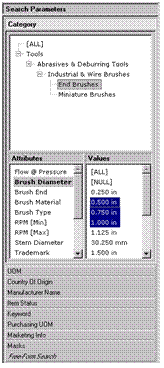

Unlike the other search tabs, a taxonomy lookup search tab permits you to select only a single value.
In a taxonomy lookup search tab, you can select values for one or more attributes before selecting a category.
As you select each attribute in the Attributes subpane, the list of values in the Valuessubpane changes to correspond to the set of values for the selected attribute.
The Attributes subpane lists attributes in priority order
rather than alphabetical order, and hides those whose priority is below the
threshold priority (for more information about the Attributes options, see
 Configuration
Options).
Configuration
Options).
To distinguish different ratings for a numeric attribute, the Attributes subpane appends the rating abbreviation in square brackets (for example Width [Max]) to the attribute name. However, MDM does not append [Nom] when Nominal is the only rating for the attribute.