
 Editing the Data Groups Hierarchy

Procedure
You can modify the Data Groups hierarchy directly from within the Add Objects dialog by clicking the Edit button to open the Edit Data Groups dialog and then using the context menu to add siblings and children, and to delete and rename existing nodes (figure below).
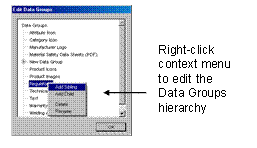

You can also edit the Data Groups hierarchy by choosing Objects ® Edit Data Groups from the main menu.
See Selecting and Deselecting Data Groups for more information about the Data Groups hierarchy.