Status
Bar
Status
Bar

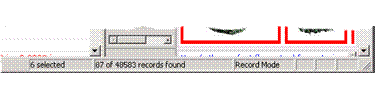
The Status bar (figure below) displays the following mode-specific information for the current table (from left to right):
● n selected (when zero or two or more records are selected)
● x of y records found (where ‘x’ is the total number of records, and ‘y’ is the number of records displayed in the Recordspane based on the current search selections)
● Record Mode