
 Usage
Tab
Usage
Tab

The Usage tab (tab in bottom pane) contains two subpanes (figure below). The Tablessubpane on the left contains the list of tables and fields to which the current object is linked; the Links subpane on the right lists the corresponding set of records for each table and field. Use the Usage tab to browse the records to which an object is linked, and also to delete links to records without having to search for each record directly.
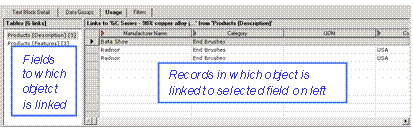

The Usage tab makes it easy to detect errors in your master data, when records that should not apply to an object show up in the list of linked records.
The left subpane is titled Tables [n links] (where ‘n’ is the total number of links to the selected object). Within the subpane, each table/field combination to which the object is linked appears in the list as tablename [fieldname] [n](where ‘n’ is the number of links of the object to that particular table/field combination). Finally, the group of table/field combinations that are inaccessible appear as a single entry at the end of the list as Inaccessible [n].
The right subpane is titled Links to ‘object’ from ‘tablename [fieldname] [x unreadable](where ‘n’ is the number of records to which the object is linked for that table/field combination and ‘x’ is the number of records, if any, that are linked but do not appear in the Links subpane because they are unreadable).