Reordering Columns

The easiest way to move a column in a grid is to click on its title and hold down the mouse button while you drag it to the desired location in the grid. A heavy black rectangle represents the column you are moving until you release the mouse button. As you drag the column, a heavy line indicates where it will be “dropped” when you release the mouse button.
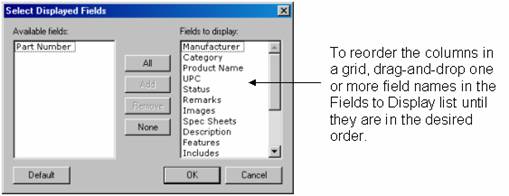
When the grid has the focus, you can also reorder columns by choosing View ® Fields (fields correspond to columns) from the main menu to open the Select Displayed Fields dialog, shown in the figure below. Highlight a field (column) you want to move in the Fields to Display list, and then click and drag the highlighted items to the desired position in the list. Repeat for each field you want to reorder. Click OK when you are done to close the Select Displayed Fields dialog.