
 Mouse and Motion Key Selection

The MDM Client supports a wide variety of methods to select one or more items from a list, tree, or grid, as follows:
Mouse click |
Deselects the existing selections, selects (or deselects) the item, and sets the anchor. |
Mouse drag |
Selects a group of items, and sets the anchor. |
Shift + click |
Deselects the existing selections and selects all items between the anchor and the clicked item without moving the anchor. |
Ctrl + click |
Selects (or deselects) the clicked item and sets the anchor while retaining existing selections. |
Motion key |
Deselects the existing selections, moves the selection highlight, and sets the anchor. |
Shift + motion key |
Extends the selection highlight without moving the anchor. |
Ctrl + motion key |
Splits off the current item highlight from a selected item for multi-item selection and moves the anchor while retaining the existing selections (figure below). |
Space |
Selects the current item while retaining existing selections. |
Ctrl + Space |
Selects (or deselects) the current item while retaining existing selections. |
Seek |
Typing characters deselects the existing selections, moves the selection highlight to the next matching list or tree item, and sets the anchor (for more information, see Typeahead Seek Selection). |

The list, tree or grid must have the focus in order to use the typeahead seek or motion-key selection methods.
The motion keys include the Left, Right, Up, and Down arrow keys, and PgUp, PgDn, Home, and End.
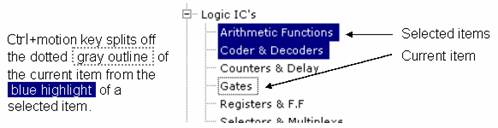
Splitting the current item from the selected item is useful when you want to select each of multiple non-adjacent items using Space instead of the mouse.