Special
Columns of the Records Pane
Special
Columns of the Records Pane

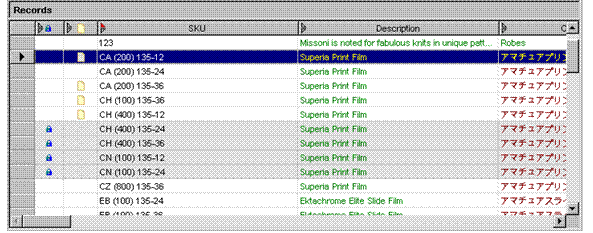
In addition to displaying a column for each field in a record, the Records pane has several special columns that indicate the record’s state:
● [Protected] column
Indicates
whether each record has been protected from editing and deletion using the
Protect command. MDM uses the lock icon
( ) as the name of the column in the Records grid and in the column of values. (All
tables.)
) as the name of the column in the Records grid and in the column of values. (All
tables.)
● [Checked Out] column
Indicates
whether each record has been checked out using the Check
In/Out commands. MDM uses the checked out icon ( ) as the name of the column in the Records grid and in the column of values. (Main table
only.)
) as the name of the column in the Records grid and in the column of values. (Main table
only.)
● [Done] column
Indicates
whether each record has been marked as done ( ) for the
current workflow task by the assignee user. Appears only when the workflow
task is selected in the Workflows tab. (All
tables.)
) for the
current workflow task by the assignee user. Appears only when the workflow
task is selected in the Workflows tab. (All
tables.)
● Validation Result columns
Indicate
whether each record has succeeded () or
failed ( ) the most recently run validation or set of
validations. MDM uses the name of the validation in square brackets as the
name of the column in the Records grid. (All
tables.)
) the most recently run validation or set of
validations. MDM uses the name of the validation in square brackets as the
name of the column in the Records grid. (All
tables.)
● Approval Result columns
Indicate
whether each record has been approved () or
disapproved () by the
approvers of an Approve step in a workflow. MDM uses the name of the approver
in square brackets as the name of the column in the Records grid. (All tables.)
● Matching Result columns
Indicate the count, maximum level, and maximum total score among potential matching records in the Records grid, and the level and individual scores for each rule for each record in the Matches grid. (Matching mode; main table only.)
An example Records grid that includes some of these columns is shown in the figure below.