
 Progress
Dialogs
Progress
Dialogs

When you perform an operation that is potentially time-consuming and may fail because it involves interaction with the system outside of MDM (such as importing one or more image files into MDM), the MDM Client often opens a progress dialog that tracks the progress of the operation, provides status information, allows you to interrupt the process before it is complete, and allows you to print out a status or error log.
A typical progress dialog is shown in the figure below.
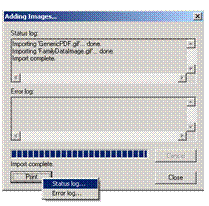

You can click on the Cancel button to interrupt an operation that is still in progress. When the operation is complete, the Close button becomes enabled and you can click on it to close the dialog.
You can click on the Print button as shown in the figure above to bring up a cascading menu that you can use to print the Status Log or the Error log. The Status Log lists the status for each item (for example, record or image imported), including errors. By contrast, the Error Log lists only those items for which errors occurred.