 Panel Properties
contentDesign
This enables you to change the design of the content area of the Panel. This property behaves like the corresponding property in a Tray or a Group.
Value
Example of the Visual Display
Description
Can be Set Using Personalization
fill
 (Panel.contentDesign=fill)
The content area appears with a background color.
Yes
plain
 (Panel.contentDesign=plain)
The content area appears with a white background and a frame.
Yes
transparent
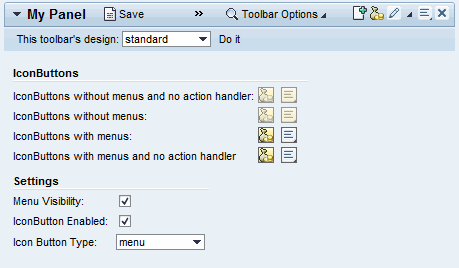 (Panel.contentDesign=transparent)
The background is transparent; the content area appears without a frame.
Yes
This property can be personalized by administrators.
contentPadding
Specifies whether there is a padding between the content area and the border of the Panel. This property corresponds to hasContentPadding of the Tray and the Group, with the difference that it has enumeration values.
Value
Visualization
Description
Can be Set Using Personalization
none
 (Panel.contentPadding=none)
There is no padding.
Yes
standard
(Panel.contentPadding=standard)There is padding.
Yes
This property can be personalized by administrators.
expandable
Specifies whether the Panel can be expanded in general.
expanded
Determines whether the Panel is expanded. The value false only shows a header with the expand icon. The toolbar and content area are invisible in this state. When you click this icon, the Panel expands and the expand button changes to a collapse button.
headerDesign
Header design
Value
Visualization
Description
Can be Set Using Personalization
standard
(Panel.contentDesign=transparent)Standard display
Yes
underline
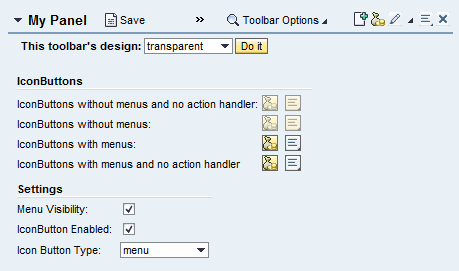 (Panel.headerDesign=underline)
Displayed underlined
Yes
This property can be personalized by administrators.
imageSource
Name and path of the icon displayed between the expand arrow and the title in the header.
More information: Handling Web Icons
isDragHandle
Determines whether the title of the panel can be used as a drag handle in layout drag and drop scenarios.
title
Text of title in the header.
This property can be personalized by administrators.
titleEditable
The title can be edited and, if for example title is linked to the context, can be written back to it. This property behaves like AccordionItem.readOnly.
 Note
NotePersonalization overrides any changes users may make. For this reason only use this feature if the text is part of the business data.
End of the note.This property can be personalized by administrators. In personalization, this property can be assigned the value: true
scrollLeft
Horizontal position of the scrollbar
scrollLeft can only be set or read dynamically. It is not possible to bind scrollLeft to the context.
scrollTop
Vertical position of the scrollbar
scrollTop can only be set or read dynamically. It is not possible to bind scrollTop to the context.
Note
The following getter and setter methods are available to get or set the vertical and horizontal position of the scrollbar:
GET_SCROLL_LEFT: Gets the horizontal scroll position
GET_SCROLL_TOP: Gets the vertical scroll position
SET_SCROLL_LEFT: Sets the horizontal scroll position
SET_SCROLL_TOP: Sets the vertical scroll position
Note
The initial value of the attributes scrollLeft and scrollTop is –1. You can no longer reach this value by scrolling. This allows the application to determine whether the container has been scrolled or not. Therefore, the smallest value that can be reached after scrolling in either direction is 0.