Overview of Customizing Classes
You use attributes bundles (such as CL_CU_AXIS, defined in the class builder) to customize graphics in the Graphical Framework. Below is an overview of the most important settings for the various attributes bundles. The list is not exhaustive.
Features
You can make customizing settings for the following:
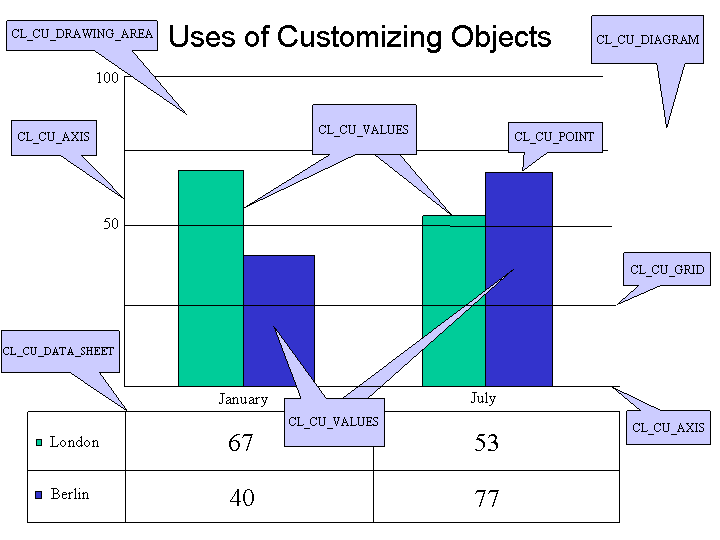
Diagram (CL_CU_DIAGRAM)
Used in business graphics
Appearance of graphic using frame / area / text / miscellaneous attributes
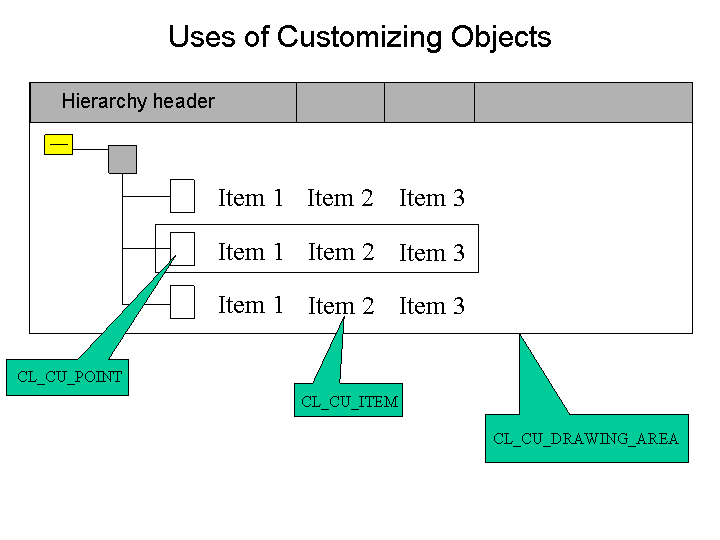
Drawing area (CL_CU_DRAWING_AREA)
Used in business and structure graphics
Title for plot area
Appearance of legend
Layout for milestone trend analysis
Data series (CL_CU_VALUES)
Used in business graphics
Chart type / subtype (for example, column / line / pie)
Labeling (type, placing, format)
Standard distribution settings
Smoothing curves
Handling of missing values
Axes (CL_CU_AXIS)
Used in business graphics
Types of axes (time, linear, logarithmic)
Specific settings for time axes
Titles for axes
Number of visible categories
Ranges (visibility, values, title)
Min. / optimum / max. values for axes
Margins
Tick marks
Width of day
Intersection points for axes
Scale (CL_CU_SCALE)
Used in business graphics
Time interval (value, format)
Step size of scale
Tick marks
Points (CL_CU_POINT)
Used in business and structure graphics
Special customizing for individual points
Labeling (type, position, alignment)
Sequence of items (hierarchy graphics)
Layout of items (hierarchy graphics)
Point expandable (hierarchy graphics)
Icons for leaf, expanded \ collapsed (hierarchy graphics)
Interaction (hierarchy graphics)
Items (CL_CU_ITEM)
Used in business and structure graphics
Types of item: Icon, checkbox, text, link, pushbutton
Column headings
ToolTips
Editing of items
Interaction with items
Grids (CL_CU_GRID)
Used in business graphics
Appearance of grid lines
Data sheet (CL_CU_DATA_SHEET)
Used in business graphics
Data sheet / table
Visibility of legend symbol within data sheet
Display context (CL_CU_DISPLAY_CONTEXT)
Used in business and structure graphics
Visibility of graphical element
Appearance of background
Colors
Lines
Border lines
Area
Type face
Markers