 MultiPane
The MultiPane UI element is used to order the contents in the form of a grid, similar to the MatrixLayout, but with the difference that the dataSource is bound against a context node.
 Note
Note
Complex UI elements such as Table, Tree, GAC*, ViewContiner, InteractiveForm, Gantt, Network, Group, and Tray are not supported. The Table UI element should be used for single-line tabular data.
Example of the Visual Display
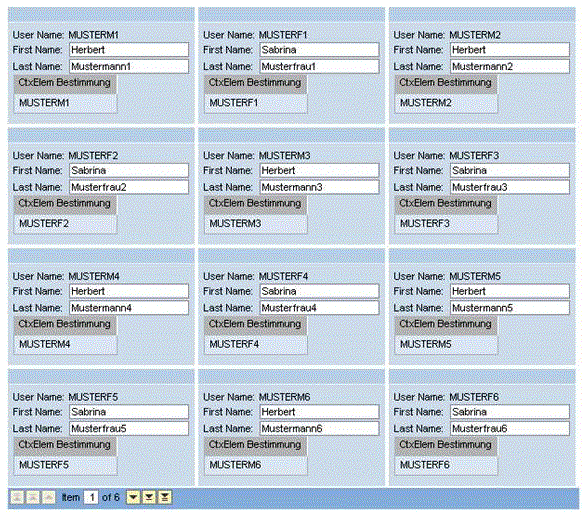 (MultiPane)
Note
To enable the development of accessible applications, the properties accessbilityDescription and tooltip are checked during the syntax check.
The new paginator
As of Release 7.31 the pager in UI element MultiPane has been replaced with a new paginator.
 (Pager)
 (Paginator)
Note
With the old pager you could navigate page by page as well as line by line, whereas with the new paginator you can only navigate line by line.
Runtime Class |
CL_WD_MULTI_PANE |
Properties in View Designer
Name |
Type |
Initial Value |
Bindable |
|---|---|---|---|
STRING |
(automatic) |
No |
|
Translatable text |
Yes |
||
I |
1 |
Yes |
|
WDUI_CONTEXT_MENU_BEHAVIOUR |
inherit |
No |
|
WDY_MD_UI_ELEMENT_REFERENCE |
No |
||
Context node |
Mandatory |
||
STRING |
Yes |
||
WDY_BOOLEAN |
true |
Yes |
|
I |
0 |
Yes |
|
I |
0 |
Yes |
|
WDY_BOOLEAN |
false |
Yes |
|
STRING |
Yes |
||
I |
-1 |
Yes |
|
I |
-1 |
Yes |
|
WDY_BOOLEAN |
true |
No |
|
WDY_BOOLEAN |
true |
No |
|
Translatable text |
Yes |
||
WDUI_VISIBILITY |
visible |
Yes |
|
STRING |
Yes |
Aggregations in View Designer
Events in View Designer
Name |
|---|
Note
Other properties that can be inherited are defined in the related higher-level classes. The related UI elements are:
Dynamic Programming
For dynamic programming, the same properties, events and aggregations are available as in the View Designer. Note the different spellings.
Dynamic Programming of Properties
View Designer Name |
Runtime Name |
Type |
|---|---|---|
ACCESSIBILITY_DESCR |
WDY_MD_TRANSLATABLE_TEXT |
|
COL_COUNT |
I |
|
CONTEXT_MENU_BEHAVIOUR |
WDUI_CONTEXT_MENU_BEHAVIOUR |
|
contextMenuBehaviour: inherit |
CL_WD_MULTI_PANE=>E_CONTEXT_MENU_BEHAVIOUR-INHERIT |
|
contextMenuBehaviour: provide |
CL_WD_MULTI_PANE=>E_CONTEXT_MENU_BEHAVIOUR-PROVIDE |
|
contextMenuBehaviour: suppress |
CL_WD_MULTI_PANE=>E_CONTEXT_MENU_BEHAVIOUR-SUPPRESS |
|
CONTEXT_MENU_ID |
WDY_MD_UI_ELEMENT_REFERENCE |
|
DATA_SOURCE |
OBJECT |
|
EMPTY_TEXT |
STRING |
|
ENABLED |
WDY_BOOLEAN |
|
FIRST_ACTUAL_PANE |
I |
|
FIRST_VISIBLE_PANE |
I |
|
FOOTER_VISIBLE |
WDY_BOOLEAN |
|
HEIGHT |
STRING |
|
PANE_COUNT |
I |
|
ROW_COUNT |
I |
|
STRETCHED_HORIZONTALLY |
WDY_BOOLEAN |
|
STRETCHED_VERTICALLY |
WDY_BOOLEAN |
|
TOOLTIP |
WDY_MD_TRANSLATABLE_TEXT |
|
VISIBLE |
WDUI_VISIBILITY |
|
visible: none |
CL_WD_MULTI_PANE=>E_VISIBLE-NONE |
|
visible: visible |
CL_WD_MULTI_PANE=>E_VISIBLE-VISIBLE |
|
WIDTH |
STRING |
|
Dynamic Programming of Events
View Designer Name |
Runtime Name |
|---|---|
ON_SCROLL |
Dynamic Programming of Aggregations
View Designer Name |
Runtime Name |
Cardinality |
|---|---|---|
CONTENT |
0..1 |
Example
You can find examples of this interface element in the system in the Web Dynpro application WDR_TEST_UI_ELEMENTS, and in the component WDR_TEST_EVENTS in the MULTI_PANE view.