PanelStack Properties 
collapseMode
Mode for collapsing the PanelStack.
Value
Example of the Visual Display
Description
none
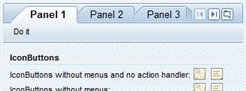 (collapseMode=none)
The PanelStack cannot be collapsed.. The triangle icon is greyed out.
toHorizontalLine
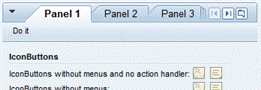 (collapseMode=toHorizontalLine)
A PanelStack is collapsed like in a Tray, that is, towards the header. The triangle icon for collapsing and expanding is displayed.
toVerticalLine
-
 Caution
This value is presently not permitted.
End of the caution.expanded
Specifies whether the PanelStack is expanded. The value false only shows a header with the expand icon. The toolbar and content area are invisible in this state. When you click this icon, the PanelStack expands and the expand button changes to a collapse button.
height
Height of the UI element; see also Methods and Properties of UI Elements.
This property can be personalized by administrators.
scrollingMode
Display of the scroll bar within the UI element.
 Note
NoteActive Elements are not supported in scrollable elements, which means these UI elements cannot be used in a container with scrollingMode <> none. If they are used, these elements are positioned incorrectly on the page.
End of the note.This property can be personalized by administrators.
Value
Description
Can be Set Using Personalization
auto
The scroll bar within the container is activated automatically.
Yes
both
A vertical and horizontal scroll bar are activated.
Yes
none
If necessary, the container is made larger so that the entire content can be displayed without scrolling.
Yes
selectedPanel
ID of the selected Panel.
NoteThe application must ensure that the selected Panel is actually visible: The application must not hide the selected Panel, and must notset an invisible Panel as selectedPanel in the PanelStack.
End of the note..
selectionChangeBehaviour
Enables the application to reset the selectedPanel property.
Value
Description
auto
With user interaction the selectedPanel is set and the onSelect event triggered.
manual
With user interaction only the onSelect event is triggered; the selectedPanel is not set by the framework. This means that the application can decide whether the Panel switch should take place or not. If the Panel switch is to take place, the application itself must set the property selectedPanel.
stackDesign
Displays the individual Panels in the PanelStack.
Value
Example of the Visual Display
Description
menu
 (stackDesign=menu)
Display in form of menu entries
tab
 (stackDesign=tab)
Display in form of tabs
width
Width of the UI element; see also Methods and Properties of UI Elements.
This property can be personalized by administrators.