
 Loading Master Data for Characteristic
"Product"
Loading Master Data for Characteristic
"Product"

Use
You create InfoPackages for the characteristic Product and execute them in order to load the master data attributes and texts from the file in the entry layer of the BI system into the Persistent Staging Area (PSA). You create data transfer processes and execute them in order to load the data from the PSA into the master data tables of the characteristic. The defined transformations are executed at this time.
Procedure
...
1. Go to the Data Warehousing Workbench; in the Modeling area choose InfoProvider.
The attributes and texts are displayed with transformation and DataSource in your InfoArea below the characteristic Product.
2. Perform the following steps, first for the attributes of the characteristic and then for the texts of the characteristic.
a. From the context menu of the DataSource, choose Create InfoPackage...
b.
On the next screen,
enter a description for the InfoPackage and choose  Save.
Save.
The InfoPackage maintenance screen for the scheduler appears.
c.
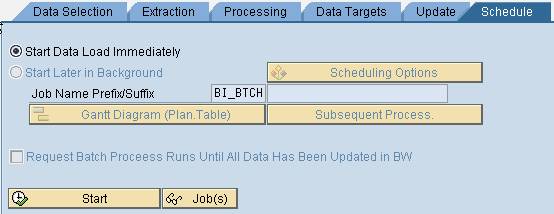
Go to the tab page
Schedule and choose  Start.
d.
To check the load
process, choose  Monitor in the toolbar of the InfoPackage maintenance
screen.
Monitor in the toolbar of the InfoPackage maintenance
screen.
e.
On the next screen,
select the date and choose  Execute.
The monitor for the load process is displayed.
f. Select the load process for your DataSource from the tree at the left of the screen.

If you cannot
find the load process directly, change the tree with  Configure Tree so that the DataSource and the data are displayed
below the status. The load process (request) is displayed below the
date.
Configure Tree so that the DataSource and the data are displayed
below the status. The load process (request) is displayed below the
date.
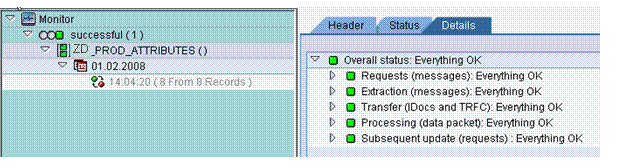
You can display the status of the individual process steps during the load process on the tab page Details.
g. Exit from the InfoPackage maintenance screen.
h. From the context menu for the DataSource, choose Create Data Transfer Process...
The system displays a generated description, the type, source and target of the data transfer process.
i.
Choose  Continue.
j. The data transfer process maintenance screen appears.
k. On the Extraction tab page, select extraction mode Full.
l. Activate the data transfer process.
m.
Select the tab page
Execute and choose  Execute.

n. Confirm the next dialog box.
The data transfer process monitor appears.
The monitor
displays the status of the load process. You can display the status of the
individual process steps during the load process on the tab page
Details. If the status is yellow, refresh the status display for the
load process with  Refresh Request.

Result
You successfully loaded the data into the master data and text table of characteristic Product. The data is now available for the analysis.
Continue with ...