
 Enabling Mobile Applications for Occasional
Connection
Enabling Mobile Applications for Occasional
Connection

With this IT scenario variant, users of mobile devices can carry out their tasks without a connection to a back-end system. The required applications and the user interface exist on the mobile device. Data is exchanged with the back end during the synchronization. Managers, truck drivers, and warehouse workers are typical users of this IT scenario variant.
SAP NetWeaver allows you to integrate various back-end systems (SAP and non-SAP systems) into your IT scenario variant.
You can use various tools and utilities to administer the IT scenario variant. These allow you to manage users, configure mobile devices, synchronize, and monitor your mobile landscape.
Architecture of the IT Scenario Variant
The following figure provides an overview of the architecture of the IT scenario variant:
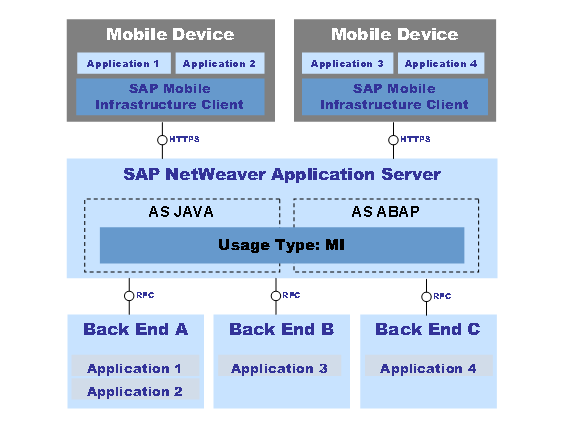
Numerous mobile devices can communicate with the back end by means of the SAP NetWeaver Application Server as the middleware.
The SAP Mobile Infrastructure Client and the mobile applications exist on the mobile devices. The usage type MI is installed on the SAP NetWeaver Application Server, which consists of a Java and an ABAP part. Multiple back-end systems can be connected to the SAP NetWeaver Application Server. On the back end, however, it is possible to install one or more applications.
Required and Optional Installable Units
To use this IT scenario, you require the following systems with activated usage types:
● Mobile Infrastructure (MI)
● Application Server ABAP (AS ABAP)
● Application Server Java (AS-JAVA)
For more information about the system landscape required, see the Master Guide.
IT Processes of the IT Scenario Variant
This IT scenario variant comprises the following IT processes:
IT Process |
Description |
After the SAP NetWeaver Application Server has been installed, you configure it for use with SAP Mobile Infrastructure and prepare the installation of the mobile devices. |
|
You must create RFC destinations, make settings for the synchronization, and deploy mobile components for every mobile application. |
|
You define the configuration for the mobile devices and create setup packages, which the user can then install on their own. Once the registration on the mobile device and the initial synchronization by the user has been completed, the mobile device is ready to use. |
|
The user can perform his or her daily tasks on the mobile device and exchange data with the back end by means of synchronization. |
Additional Information
The following role-specific guides contain further information about this IT scenario variant:
Task Area |
Guide |
System Landscape |
For more information, see the Master Guide at service.sap.com/installNW70 |
Installation, Upgrade |
For more
information, see
|
Configuration |
SAP Solution
Manager or
|
Administration |
Technical Operations Manual: MI (Mobile Infrastructure) |
Security |
Security Guide:
|
 Technology
Consultant's Guide
Technology
Consultant's Guide